Windows 10 Required files taking up over 100gb of space
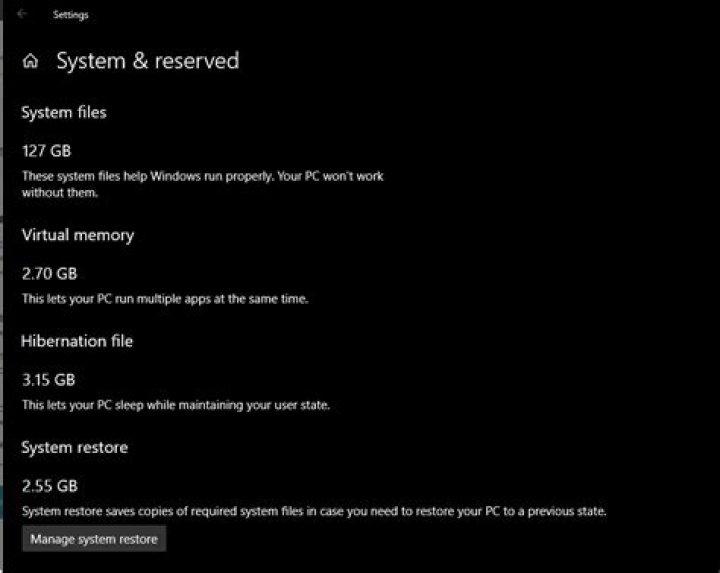
I have had windows 10 on a partition for a while, but I am very new to using it. I noticed today that I was missing a lot of space on that partition. When I opened the Storage settings to try and figure out where all of the space as allocated I noticed that the Windows system files were taking up a huge chunk of space.
Is this correct for a Windows 10 installation for a single user? I can't figure out how to get this space back and none of the answers I get from googling solve the problem and most are over a year old.
Thanks in advance for any suggestions with how to trouble shoot this!
3 Answers
You may use a utility such asTreeSize Freeto locate where this space is used.
There is a good chance that it is used by the file Windows.edb, which is the
database file of the Windows Search service.
This is a hidden file located in the following folder:
C:\ProgramData\Microsoft\Search\Data\Applications\Windows\Windows.edbMy own recommendation is toDisable Search Indexing in Windowsand install instead Voidtools Everything.
Disabling Windows Search is done inControl Panel > Programs and Features > Turn Windows features on or offand uncheck "Windows Search". You may then delete Windows.edb.
Otherwise, if you decide to keep Windows Search, to regenerate Windows.edbdo the following:
- Stop the Windows Search service in the
Services.mscapplet - Delete
Windows.edb - Restart the Windows Search service
- Open Control Panel > Indexing Options > Advanced and click "Delete and rebuild index".
(The last step may be enough.)
6That is 4 times the amount that i have and ive had it installed for quite some time. I am using version 1809. If I remember correctly in version 1903 and ongoing they introduced a feature that reserves a certain % of your hard drive so that windows updates can always have room to install. I would also check how much of what data is in there for cache and old windows updates and maybe even windows upgrade files by using disk cleanup and seeing the breakdown there.
1It is very unusual, might be if you upgraded any old version of windows or somehow because of dual booting(assumption). But you can try the following if it helps:
Open Settings
Update & Security
Recovery
Reset this PC
Choose an option
Keep my files(I recommend to still backup all your data of all your drives{if you are dual booting})
If this did not work, I suggest doing a clean install using the official Microsoft ISO from here.


