Why would ExpressCache.exe appear to be constantly using an external HDD?
I bought ASUS VivoBook S550CM with hybrid drive SSD/HDD. There are many pre-installed Asus utilities, ExpressCache included.
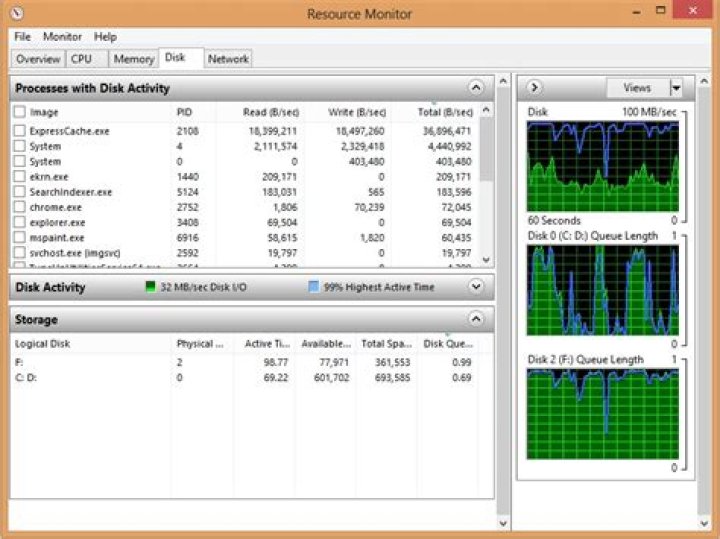
Here is the problem: every time I connect any external USB HDD, the LED indicator on external HDD starts to blink. When I open Resource Monitor I see that ExpressCache.exe is constantly writing/reading something from external drive. See screenshot. So all external drives are being constantly accessed. This is slowing them down when I want to use them and they are very noisy. I tried to reinstall the Asus ExpressCache utility and nothing changed... Hard reset didn't work too...
Any idea on how to fix this...???
Screenshot:
4 Answers
A possible reason for the activity is that there is a feature within ExpressCache that will defragment the disks connected to the system. This is typically done as a background task and will not effect the performance of the system although you may see the activity a bit high at the beginning but as the disk drives become defragmented the activity will be reduced to almost zero.
2The correct solution is simply to remove ExpressCache. Windows already has two different file cacheing mechanisms in it (one reactive, one proactive). There isn't really a need for a third. Your hybrid drive similarly already has cacheing algorithms built in.
I bought an Asus S550CB in 2014 also with a 30 GB SSD (Kingston) drive in addition to the 1 TB hard drive. Have upgraded to Windows 10 and was having problems shutting down,restarting,sleep and hibernation.Also the computer randomly freezing when I clicked too many times and taking forever to load. I think I have figured out why.All due to this expresscache.exe that runs on the expresscache service. It was jamming the hard drive and freezing the computer and not responding to the Windows commands for power down (shutdown,hibernate,etc.). I was getting a blue screen showing "Power state failure" due to a driver not powering down its state etc. I stopped the expresscache service from running automatically and now everything seems to work just fine. No freezing or shutdown hibernate problems. So far!....
I've not verified this works, but the eccmd.exe command line tool that comes with expresscache appears to have an "exclude" option. Running cmd.exe as administrator I can see:
C:\WINDOWS\system32> eccmd -nologo
USAGE: ECCmd [-NOLOGO] [-INFO | -PARTITION | -EXCLUDE | -CLEAREXCLUSIONS | -FORMAT | -PRELOAD] -NOLOGO - No copyright message will be displayed. -INFO - Display ExpressCache activity information. -PARTITION - Create an ExpressCache partition. [DriveId] - Optional drive ID [PartSize] - Optional partition size in MB -EXCLUDE - Exclude a drive from being cached. DriveLetter - Drive letter -CLEAREXCLUSIONS - Clear all cache exclusions. -FORMAT - Format the cache volume. -PRELOAD - Preload a folder or a file into the cache FileName - File or folder name to be cached [UsageCount] - Optional file usage count.
It appears you can turn off caching for some drive letters. I've only got the internal drive so haven't been able to confirm this.
(Now if I was only brave enough to try upgrading to a newer version :-) )


