Why redirect output to 2>&1 and 1>&2?
I have come across several commands that use 2>&1 and 1>&2, but I quite can't get my head around the purpose of using it and when I should be using it.
What I understand
I know that 1 represents standard out and 2 represents standard error. I understand that 2>&1 combines the output of 2 to 1 and vice versa.
What I don't get
- When should I be using it?
- What purpose does it serve?
8 Answers
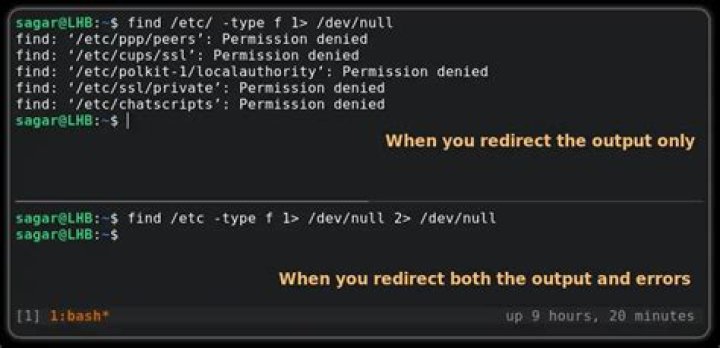
Sometimes you want to redirect both stdout and stderr to the same location, This is when >& is used – it points one file descriptor to another.
For example, if you want to write both stdout and stderr to the same file (be it /dev/null or output.txt), you can redirect them separately, with
app 1>/dev/null 2>/dev/nullor you could redirect one file descriptor to the file, and the other file descriptor into the first one:
app 1>/dev/null 2>&1
app 2>/dev/null 1>&2
In the first example, 2>&1 points file descriptor #2 to where #1 is already pointing. The second example achieves the same, just starting with stderr instead.
As another example, there are cases when stdout (file descriptor #1) is already pointing to the desired location, but you cannot refer to it by name (it may be associated with a pipe, a socket, or such). This often happens when using process expansion (the ` ` or $( ) operators), which normally only captures stdout, but you may want to include stderr in it. In this case, you would also use >& to point stderr to stdout:
out=$(app 2>&1)Another common example is a pager, or grep, or similar utility, since the pipe | normally only works on stdout, you would redirect stderr to stdout before using the pipe:
app 2>&1 | grep helloHow to know which of 2>&1 or 1>&2 is correct? The already set up file descriptor goes to the right of >&, and the file descriptor you want to redirect goes to the left. (2>&1 means "point file descriptor #2 to file descriptor #1".)
Some shells have shortcuts for common redirections; here are examples from Bash:
1>can be shortened to just>1>foo 2>&1to>&fooor&>foo2>&1 | programto|& program
One situation when you need it is when you want to display strace output in a pager. strace prints its output to standard error and pipes generally connect standard output to standard input, so you have to use the redirect:
strace -p $pid 2>&1 | lessSometimes you want to redirect both stdout (1) and stderr (2) to the same location (/dev/null, for example). One way of achieving this would be:
$ program 1>/dev/null 2>/dev/nullBut most people shorten this by redirecting stderr to stdout with 2>&1:
$ program 1>/dev/null 2>&1An even shorter version is:
$ program >&- 2>&-2: It is for when you will have output coming from both standard error and standard out, and you want them composed into a single string.
1: When you want to manipulate the output of both standard error and standard out.
2I use it to start a detached job:
someProgram 2>&1 >& my.log &then I can log out, and someProgram will still be running. The functionality is provided by GNU Screen, tmux and some other programs -- but here it is achieved with none of external dependencies.
5Imagine there is a directory named try that has these three files: file file1 and file2.
Now run this command:
cat file file1 file2 file3The first three files open but cat throws an error while opening the fourth one as it does not exist.
Now run:
cat file file1 file2 file3 1>outfile 2>&1You will not see any output on the screen: Firstly 1>outfile will redirect the output of the command to outfile and then it will redirect (2>&1) the error thrown while trying to open file3 to outfile.
1>&2 works similarly and redirects the error stream to standard output.
Hope this helps!
Alternative scenario: terminal commands show output into another terminal
Use the tty command in each terminal to identify them:
$ tty
/dev/pts/0
$ tty
/dev/pts/1
Assuming these TTYs, to redirect the first's stdout to the second, run this in the first terminal:
exec 1>/dev/pts/1Note: Now every command output will show on pts/1
To restore default behavior stdout of pts/0:
exec 1>/dev/pts/0See this video for a demonstration.
The case when re-directing stderr to stdout has already been covered here (e.g. use it to filter (grep) error messages).
The other case is redirecting stdout to stderr. A common usecase (at least for me) is to send warnings/error messages printed with "echo" (in my shellscripts) to the stderr (so they can catch the attention of the user more easily).
For example,
echo "file \"${file\" does not exist..." 1>&2

