Why is Windows showing space being used but there are no files (9gb)?
I have just taken off personal files from my hard drive to a back up drive, the drive is now empty of all files including hidden files but is showing 9.3gb of space being used.
My recycle bin is empty and I've just deleted temporary files and I don't encrypt files
Why is that?!
7 Answers
I recommend scanning the drive with WinDirStat which will show all your files, including NTFS based-ones.
2Could be shadow copies... go to My Computer, right-click any drive, go to Properties, and check the Shadow Copies tab.
Also, it could be files in the Recycle Bin, if you deleted something and haven't emptied it yet.
2The NTFS file system use a central "Master File Table" for storing the sectors where each files starts and which sectors belong to the file. This Master File Table is stored on the drive in form of an invisible file (MFT$).
It is crucial for the whole drive that this $MFT file has free space to store infors for new files, therefore Windows reserves some megabytes - this is most likely one part of the used space you see. Therefore event if you format a drive the now complete empty device will again have some used space because the $MFT file is there.
Furthermore there are other hidden files and folders, such as System Volume Information (contains the volume shadow copy files), pagefile.sys, hiberfil.sys, swapfile.sys and more.
For more details on the MFT see the Microsoft article "How NTFS reserves space for its Master File Table (MFT)"
Probably the pagefile. You can run space sniffer, which is a very lightweight tool that graphically shows the distribution of file usage, in order to verify what's actually being used on the drive:
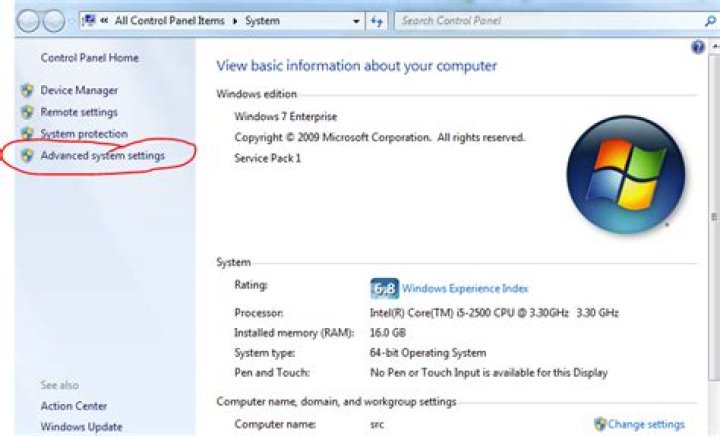
Windows keeps some space on the harddrive (pagefile) which acts like physical memory and it manages that automatically in windows 7. To manage manually click Start and type "View Advanced System Settings"... that opens the system properties window. Click the "settings button int he performance section. Then click the Advanced tab and click "Change" on the virtual memory. There you can change the drive the page file is saved on, but don't go below the recommended amounts.
Most likely this is from hidden system files like the System Restore Image
Go to your System Properties page by clicking Advanced System Settings from the system info page.
from there go to your sytem protection tab and check that protection is set to off
I had this problem and was able to resolve by deleting pagefile.sys (as indicated in other responses).
** The key indicator was that I deleted all files on the disk and it still showed as having space used on drive.
** Also, search registry and you'll find a key for pagefile.sys on the target drive
Here is a link with instructions: that has the details to find and modify pagefile settings.
2I had this problem but with fewer, only about 3.6GB of files. When I clicked the recycler folder there was that cryptic long string of numbers and dashes named system folder, so I right clicked it to get a context menu where I had a 3rd party file search app called Agent Ransack, though any similar search app would work (WHY OH WHY Microsoft, did you screw up something as simple as the windows SEARCH FEATURE? GRRRR!).
Anyway, I did a file search on that cryptically named folder in Recycler and it found several files. I highlighted and deleted them all and it refused to delete several entries so I skipped them, but then when it was done deleting it couldn't find ANY files there any longer and the space had been recovered.
No idea how it happened, I'd done a scan of the drive previously and windows found nothing wrong with it, and all the files were old, from around almost a year ago which was a couple months after I'd set up that install of windows. Anyway they're gone now.


