Why have both /mnt and /media?
It seems to me that having both /mnt and /media is a little redundant. Is there any tangible difference between the two that I'm not aware of?
Is there a standard that most people follow for where to mount things, e.g. use one for certain types of devices, or is this completely subjective?
15 Answers
The new standard is that /media is where the system mounts removable media, and /mnt is for you to mount things manually.
See the filesystem hierarchy standard (FHS) for details.
5Another important difference not mentioned yet is that devices mounted under /mnt will not appear in Nautilus' left pane, whilst those mounted under /media (as well as auto-detected devices that are not mounted yet) will.
So for example, if you don't want a certain partition to appear in the "Devices" subsection of Nautilus' left pane, you should create a subdirectory for it under /mnt, write an entry for said partition in your /etc/fstab (or do it through the Disks utility) and assign the newly created directory as its mount point:
/dev/{block_device_name) /mnt/{descriptive_name} {fs_type} {mount,options} 0 2Even better, add the noauto mount option in fstab/Disks and then your partition won't appear in Nautilus nor will it be mounted (preventing accidental mess with its files)! So for example, in the case of a dual-boot with Windows you could have:
/dev/sda1 /mnt/win7 ntfs-3g rw,user,noauto,gid=100,uid=1000,nls=utf8,umask=002 0 0in your /etc/fstab, and hence have your Windows partition not showing up in Nautilus (but still accessible through the mount command if you ever need it).
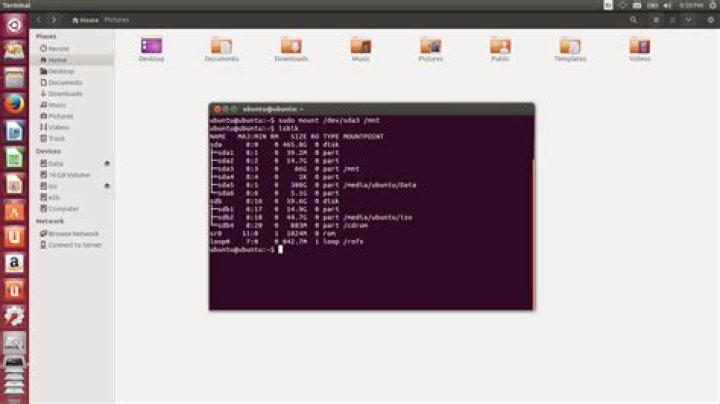
Here is a screenshot I made with a liveUSB, showing all three cases:
- auto-detected devices not mounted ("16 GB Volume"
/dev/sdb1) - devices mounted on a
/mediasubdirectory and showing up in Nautilus ("iso"/dev/sdb2) - my Windows partition
/dev/sda3mounted on/mntbut not showing up in Nautilus left pane (it would be the same if it wasn't mounted since I have an entry for it in my fstab).
On the contrary, I want my shared data partition to show up in nautilus, so I assigned a /media mount point to it and set the auto mount option, so I can just click on Data and access it from the GUI.
To me this is THE big difference between those two directories, that I learned about when trying to do just what I explained ;-)
2As I understand it, /media is for mounting things like optical drives and other temporary media, where /mnt is usually for permanently attached storage (generally internal disks).
Of course, you can also mount a device anywhere you want... the /mnt and /media directories are more conventional though.
1/mnt was already accepted as a place to manually and temporarily mount external media. The /media directory was created as a place under which multiple media, external or otherwise, could be automatically mounted.
2This thing goes deeper:
I like to keep internal drives mounted on /mnt, and external removables on /media.
This post illustrates a difference in functioning, where /media blocked access to certain system and user processes, (because of the default limiting umask attached to any drive that is mounted) where as /mnt acted like the host filesystem.


