Where is the Firefox Cache?
With all the big changes with Firefox recently, all the info about their cache location has become outdated. Or has Firefox changed so much that this question is moot?
Running mac osx 10.6.8 (Snow Leopard). I need to recover some files that are most likely still in the cache. Thanks!
22 Answers
According to the MozillaZine Knowledge Base article Profile folder - Firefox:
Mac
Profile folders are in one of these locations:
~/Library/Mozilla/Firefox/Profiles/<profile folder>
~/Library/Application Support/Firefox/Profiles/<profile folder>
The tilde character (~) refers to the current user's Home folder, so ~/Library is the /Macintosh HD/Users//Library folder.
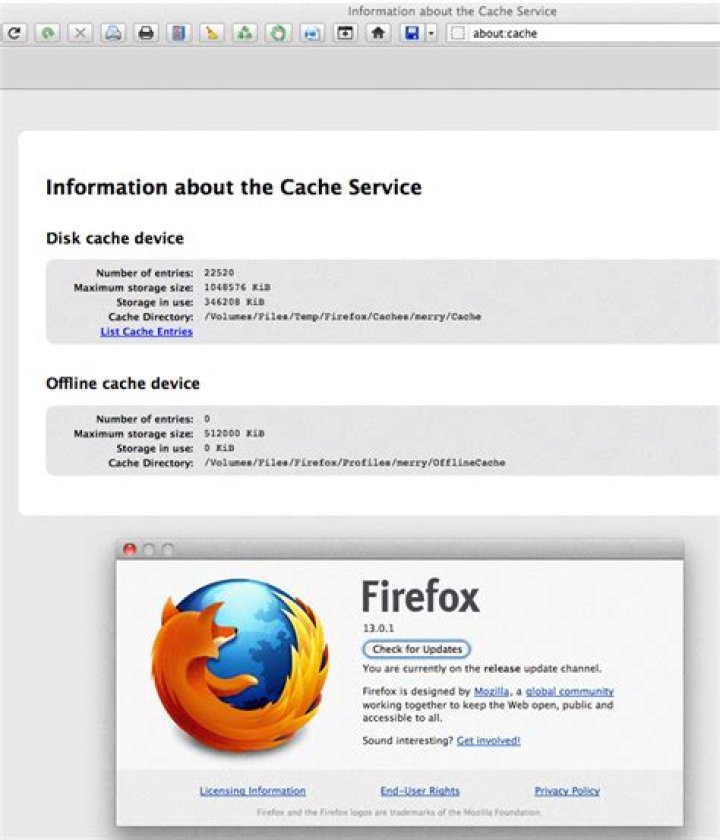
This section of that article describes the default cache location. You can also see where it is with this url: about:cache and change it by entering this one: about:config and then changing the preference named browser.cache.disk.parent_directory.
Update:
I haven't updated the screenshot, but this still works in FireFox 15.0.1.
Here's a screenshot of Firefox 13.0.1 running on OSX 0.6.8 (Snow Leopard). As you can see the cache folder has been put in a custom location on another volume using about:config.
Go to ~/Users/"USERNAME"/Library/Caches/Firefox/Profiles/ with "USERNAME" being the name of your home folder of your OS.
Then open the folder with a bunch of funny numbers at the beginning and ends with .default then open the cache folder.
3

