What is "sh: 1: pause: not found"?
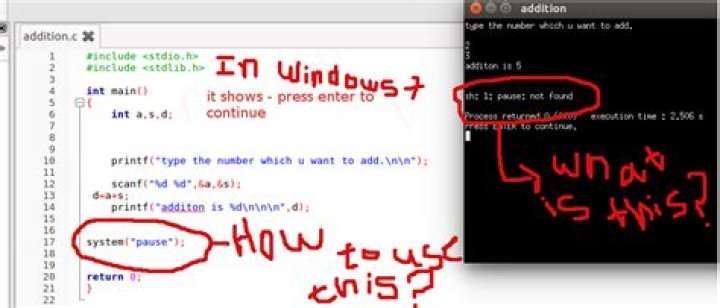
I am learning C as first programming language. I have typed following source code:
#include <stdio.h>
#include <stdlib.h>
int main()
{ int a,s,d; printf("type the number which you want to add.\n\n"); scanf("%d %d",&a,&s); d=a+s; printf("addition is %d\n\n\n",d); system("pause"); return 0;
}
I have typed the same source code in Code::blocks in both Windows 7 and Ubuntu using Code::blocks, but in Ubuntu when I run it, in the end it says
sh: 1: pause: not found3 Answers
The system(...) function in C takes a command as string (which is a char array in C) and passes it to the operating system's default command processor/shell to execute it.
On Windows, this would by done by cmd.exe, which has an internal command pause that prints something like "Press any key to continue..." and waits for a keyboard event before it quits.
However, Ubuntu luckily does not have cmd.exe, but uses sh here as its default shell (which is dash internally), which does not have a pause command. You can use something like this instead:
read -p 'Press Enter to continue...' varSee What is the bash equivalent of DOS's pause command? and What is the Linux equivalent to DOS pause? (Stack Overflow) for more info, but note that C calls sh here and not bash.
So in your C code, the line could be replaced with:
system("read -p 'Press Enter to continue...' var");This would make your program runnable only on Linux systems with sh-compatible shells though, it would no longer work on Windows in this form.
However, please note that the use of system("pause"); or similar (even platform-independent) alternatives is generally discouraged for reasons explained well in system(“pause”); - Why is it wrong?
The first rule of the system() call is to never use it unless you have a very good reason. It launches a shell as a subprocess which a) is a somewhat expensive operation, and b) opens up the full shell command language (which is awful if you build the command line from input from the user).
Here, what you are trying to achieve with that, is printing a prompt, and waiting for a keypress. You already know how to print something, and reading isn't much harder. Either loop over getchar() until you see a newline (\n), or read a full line with fgets().
However, since you used scanf() previously, the newline ending the user's input will still be in the input buffer. This is because the terminal will normally give the program only full lines, but scanf("%d") doesn't use the parts after the digits. fgets() also matches better with the terminal's behaviour here.
As Byte Commander♦ rightfully explained pause is a windows specific command and will not work on linux by default.
you can either choose between a windows or linux counter part at compile time by doing something like this:
#if defined(_WIN32) define PAUSE "pause"
#elif defined(unix) || defined(__unix__) || defined(__unix) define PAUSE "read -p 'Press Enter to continue...' var"
and in your code simply do :
std::system(PAUSE);or simply ussimply do :
void pause()
{ std::cout<<"Press any key to continue"; std::getchar();
}
it works everywhere!


