What does this BusyBox initramfs error message mean?
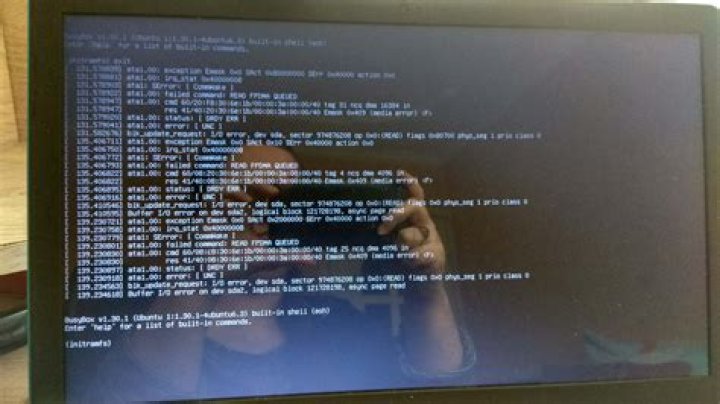
I re-installed Ubuntu, but after a couple of days I got the BusyBox error again.
1 Answer
initramfs, abbreviated from "initial RAM file system", is a cpio ("copy in and out") archive of the initial file system that gets loaded into memory during the Linux startup process.It is used as the first root file system that your machine has access to.
BusyBox is software that provides several stripped-down Unix tools in a single executable file. It provides replacements for most of the utilities you usually find in GNU fileutils, shellutils, etc.
You get the Busybox initramfs error when your file system partition has some errors. In the output they tell you the partition which is corrupted.
When you encounter this type of problem, you need to check and repair the problematic Linux filesystems with the fsck command.
Suppose you have the following error message:
**/dev/sda1** contains a file system with errors, check forced.
Inode 4326476 extent tree (at level 1) could be narrower, IGNORED.
/dev/sda1: Inode 4326843 extent tree (at level 1) could be narrower,IGNORED.
/dev/sda1: Inode 4327012 extent tree (at level 1) could be narrower,IGNORED.
/dev/sda1: Inode 4329004 extent tree (at level 1) could be narrower,IGNORED.
/dev/sda1: Inodes that were part of a corrupted orphan linked list found.
/dev/sda1: UNEXPECTED INCONSISTENCY; RUN fsck MANUALLY.
(i.e., without -a or -p options)
fsck exited with status code 4.
**The root filesystem on /dev/sda1 requires a manual fsck.**
BusyBox v1.30.1 (Ubuntu 1:1.30.1-4ubuntu6.1) built-in shell (ash)
Enter 'help' for a list of built-in commands.
(initramfs)
In this case you see that the corrupted partition is /dev/sda1. To solve the problem, we will use the fsck command specifying the partition which is corrupted (/dev/sda1):
fsck /dev/sda1 -yAfter the execution is done, run:
exitPlease note that sometimes you don't see any errors after running the exit command. In that case, try to run fsck on all filesystems.


