What does it mean to be outside of subnet mask but connected to network?
My current subnet mask is 255.255.255.0 (CIDR /24).
But when I do a scan of my network with /16 mask (255.255.0.0), all kinds of devices appear connected to my network, some of them having local ip of 192.168.102.12 (for example), but this ip address is out of my current accesible network, based on my subnet mask.
What I want to know is what does this mean? Are all these devices configured by the ISP to be connected to my router and use it as an access point? Or what?
12 Answers
You've essentially asked two questions. (Maybe you didn't ask about subnet masks, but I'm going to explain anyways for other readers)
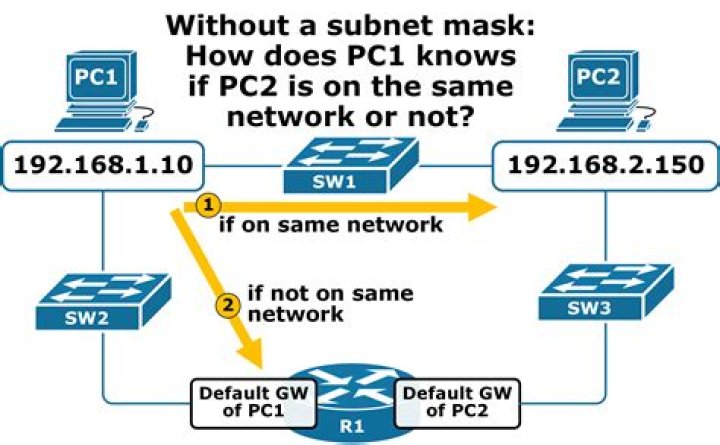
1) What is a subnet mask and how does it work? An IP address consists of a NETWORK address and a HOST address portion. The subnet mask tells a device what part of the IP address is the NETWORK address and what part is the HOST address. Every time a device wants to communicate to another IP address, it first has to perform a mathematical operation that combines the subnet mask with the IP address to determine if the remote IP address is directly connected to the same network as itself. If it is, it can send the packet of information directly to the device. If it is not, and the remote IP is on another network, the device will instead send the packet to the default or static route it has configured that can handle getting the data to the remote endpoint.
If your IP address is 192.168.1.23 and subnet is 255.255.255.0 then the network address is 192.168.1.0 and your host address is 0.0.0.23. Any other host in the range 192.168.1.1-192.168.1.255 is on the SAME network as you. Any other IP address is not on the same network as you. To communicate with 192.168.100.10 your computer would have to send the information to the default gateway (router) on your network at 192.168.1.1 and the router at 192.168.1.1 will determine what to do next with it.
2) Why do I see devices outside my network when I scan?
This is a good question. First, if you are scanning the larger /16 network - there is nothing technically wrong with this. But, be aware that you are scanning some device known to be on the same network as you and other devices that are on a different network beyond your router.
Because the IP addresses you are working with are considered "private," they are non-routable addresses. Meaning internet based routers will NOT route information destined to those IP addresses. So, it's not possible that those IP addresses you see are coming from the internet in anyway. What you are likely seeing is some artifact in the router, and how it is handling the probes. Especially if you are doing any type of special scans like a SYN scan.
While interesting, I don't believe it is anything to be concerned with.
Just having a different subnet does not necessarily mean your devices cannot talk to each other. The subnet mask, in combination with your ip address, defines which other devices yours will talk to and listen to (mind you I'm simplifying the details greatly).
So let's say your computer has a subnet of 255.255.255.0 and an ip of 192.168.102.11. This means your computer will only talk to other devices that have a 192.168.102.xxx address. Now let's assume you have another computer on the same physical network with a subnet of 255.255.0.0 and the IP of 192.168.102.12 (as you said above). That computer will only talk and listen to devices with a 192.168.xxx.xxx address.
192.168.102.11 => 255.255.255.000 = 192.168.102.xxx
192.168.102.12 => 255.255.000.000 = 192.168.xxx.xxx
Which means the subnets overlap (192.168.102.xxx is contained within 192.168.xxx.xxx) and the computers (both being in the overlapping part) can talk to each other.
192.168.102.11/24 <-> 192.168.102.12/16
If you change the second one to 192.168.103.12 now the first computer can't talk to the second cause 192.168.103.12 is not within 192.168.102.xxx. However, the second computer still thinks it should be able to talk to the first because 192.168.102.11 is within 192.168.xxx.xxx. because of this such a configuration is considered broken and should be avoided.
192.168.103.11 => 255.255.255.000 = 192.168.103.xxx
192.168.102.12 => 255.255.000.000 = 192.168.xxx.xxx
192.168.103.11/24 <-X 192.168.102.12/16
But then I don't really know what you mean by "scan of my network with /16 mask (255.255.0.0)". Scan how? Depending on what, exactly, that means it may be that all the IPs you are seeing are actually configured to use a 255.255.255.0 subnet mask. After all, if those IPs are within the 192.168.102.xxx range then they must be within the 192.168.xxx.xxx range as well and a scan of the latter would devices within the former (in addition to devices that aren't... depending on how the scan is done).
If you would like a more technical explanation of subnet masks and the mechanics this is a good start.


