Using IF AND/OR (ISNUMBER(SEARCH formula
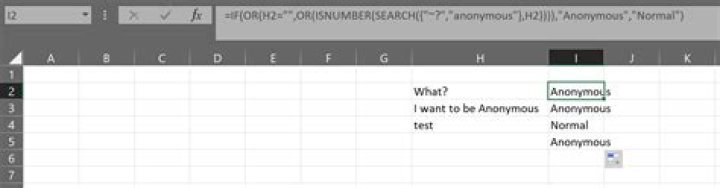
I am looking for a way to combine the three formulas below:
- =IF(ISNUMBER(SEARCH("anonymous",H2)),"Anonymous","Normal")
- =IF(ISNUMBER(SEARCH("~?",H2)),"Anonymous","Normal")
- =IF(H2="","Anonymous","Normal")
So if the text (multiply words) in H2 contains "?" or "anonymous" or is empty it should return "Anonymous". Otherwise it should return "Normal". All formulas work fine separately but I'm stuck on how to combine them.
Any suggestions?
2 Answers
You can use an array in the SEARCH: {"~?","Anonymous}
Then it is just a matter of using OR strategically to check:
=IF(OR(H2="",OR(ISNUMBER(SEARCH({"~?","anonymous"},H2)))),"Anonymous","Normal")It doesn't highlight so no idea why it works for you but not for me. However, I found another solution: =IF(OR(ISNUMBER(SEARCH("anonymous",H2)),ISNUMBER(SEARCH("~?",H2)),H2=""),"Anonymous","Normal")
Thanks for your help!


