Unable to type in Greek using iBus but can type Japaneese and English as well
Because I need to type in Japanese I switched my language input into iBus as seen in this question. But whilst I am able to type in Japanese and in English I am unable to type into Greek even if I select the Greek Language.
My iBus Settings are the following:
Whilst the xkb input settings are the following (/etc/default/keyboard):
# KEYBOARD CONFIGURATION FILE
# Consult the keyboard(5) manual page.
XKBMODEL="pc105"
XKBLAYOUT="us"
XKBVARIANT=""
XKBOPTIONS=""
BACKSPACE="guess"
So how I can type back into Greek Language?
21 Answer
Well you need to do a bit of massaging but it is plausible. First of all you need to do the following steps:
- Set the
GreekLanguage into default system language viaxkb. - Let iBus somehow to "synchronize" with
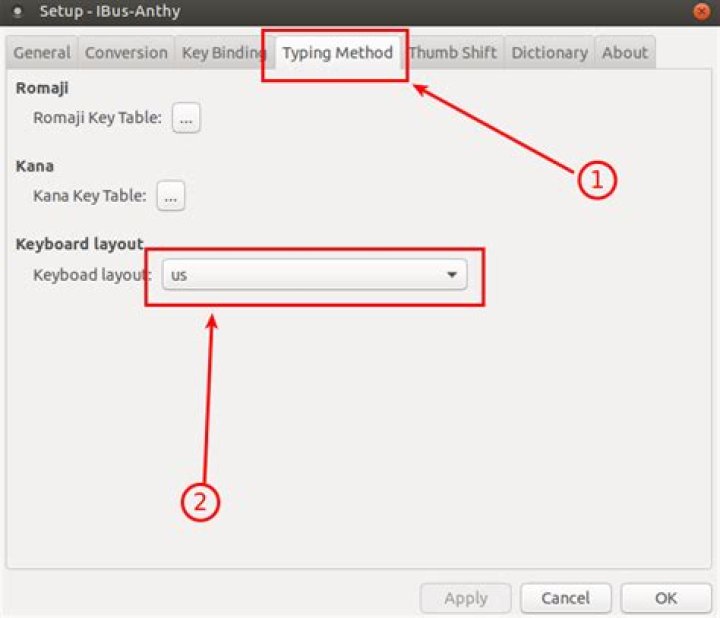
xkb. - Make Anthy to use the English layout as the base layout.
The only issue is that 2 language indicators are shown, please get the information about the current input method via the iBus one.
For the step 1 replace the /etc/default/keyboard with the following:
# KEYBOARD CONFIGURATION FILE
# Consult the keyboard(5) manual page.
XKBLAYOUT="us,gr"
XKBVARIANT=","
BACKSPACE="guess"
XKBMODEL="pc105"
XKBOPTIONS="grp_led:scroll"
Then on step 2 deselect the following on ibus-setup (aka IBus Preferences):
Then for the step 3 shows on ibus-setup Select the following tab and click as the steps the following screenshot shows:
Then set the us keyboard variant as the default one as the following screenshot shows:
Now you can type either in Greek, Japaneese and English. The language change is handled via iBus thus in order to change the language change keystroke (for example setting the Alt+Shift as language change keystroke) follow these steps:


