Ubuntu 20.04.1 systemd-resolved error NXDOMAIN
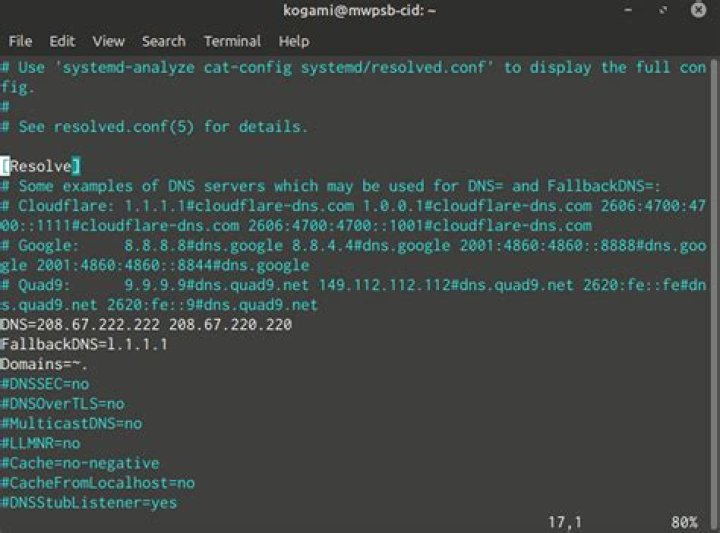
I'm currently testing Ubuntu 20.04.1 (after decades using Fedora from Core 2 to 31), and I have currently issue with local/private DNS resolution.
Getting systematically error messages linked to this vulnerability:
Server returned error NXDOMAIN, mitigating potential DNS violation DVE-2018-0001, retrying transaction with reduced feature level UDP
Simplified context:
- I have a Synology Router which provides Ethernet network (its @IP address 192.168.56.1)
- it is the one providing DHCP server
- each of my devices (about 10) have a specific DHCP registration, with a specific name
For sake of simplification, let's consider the Device named 'nas'.
Out of the box, my Ubuntu 20.04.1 LTS refuses to resolve nas, whatever the used command, see end of this question.
After plenty of readings on Stackoverflow, and Forum, I tried, without success:
- install libnss-resolve, which enhance /etc/nsswitch.conf file
- change /etc/resolv.conf symbolic link from /run/systemd/resolve/stub-resolv.conf to /run/systemd/resolve/resolv.conf
- hack /etc/systemd/resolved.conf file specifying @IP address of my router as DNS server
- hack /etc/sysctl.conf file to define kernel.domainname with a specific domain, like defined on my Synology Router (previously there was none, and it was working with Fedora)
- flush the cache
sudo systemd-resolve --flush-caches
Tests:
systemd-resolve nasnas: resolve call failed: No appropriate name servers or networks for name founddig nas; <<>> DiG 9.16.1-Ubuntu <<>> nas
;; global options: +cmd
;; Got answer:
;; ->>HEADER<<- opcode: QUERY, status: SERVFAIL, id: 65082
;; flags: qr rd ra; QUERY: 1, ANSWER: 0, AUTHORITY: 0, ADDITIONAL: 1
;; OPT PSEUDOSECTION:
; EDNS: version: 0, flags:; udp: 65494
;; QUESTION SECTION:
;nas. IN A
;; Query time: 4 msec
;; SERVER: 127.0.0.53#53(127.0.0.53)
;; WHEN: mer. juil. 29 15:13:09 CEST 2020
;; MSG SIZE rcvd: 32dig @192.168.56.1 nas; <<>> DiG 9.16.1-Ubuntu <<>> @192.168.56.1 nas
; (1 server found)
;; global options: +cmd
;; Got answer:
;; ->>HEADER<<- opcode: QUERY, status: NXDOMAIN, id: 34633
;; flags: qr rd ra; QUERY: 1, ANSWER: 0, AUTHORITY: 1, ADDITIONAL: 1
;; OPT PSEUDOSECTION:
; EDNS: version: 0, flags:; udp: 512
;; QUESTION SECTION:
;nas. IN A
;; AUTHORITY SECTION:
. 86064 IN SOA a.root-servers.net. nstld.verisign-grs.com. 2020072900 1800 900 604800 86400
;; Query time: 24 msec
;; SERVER: 192.168.56.1#53(192.168.56.1)
;; WHEN: mer. juil. 29 15:13:30 CEST 2020
;; MSG SIZE rcvd: 107nslookup nasServer: 127.0.0.53 Address: 127.0.0.53#53
** server can't find nas: SERVFAIL
Current contents of my /etc/resolv.conf (the default one):
nameserver 127.0.0.53
options edns0
Current contents of my /etc/nsswitch.conf:
passwd: files systemd
group: files systemd
shadow: files
gshadow: files
hosts: files mdns4_minimal [NOTFOUND=return] resolve [!UNAVAIL=return] dns
networks: files
protocols: db files
services: db files
ethers: db files
rpc: db files
netgroup: nis
Of course, adding @ip/name mapping in /etc/hosts works but it is NOT a solution.
How can I fix this issue?
121 Answer
This error means the DNS server could not resolve the domain. It generally means that your local dns setup sends queries about local domains (.local, .lan, .home, ...) to remode dns servers. In my case, I had configured "Domains=" (with my local search domain) in /etc/systemd/resolved.conf, but no "DNS=" (leaving this to DHCP), which is wrong. When the dns server is provided by dhcp, the search domain has to be provided the same way.
5

