Ubuntu 18.04 not showing maximum usable ram
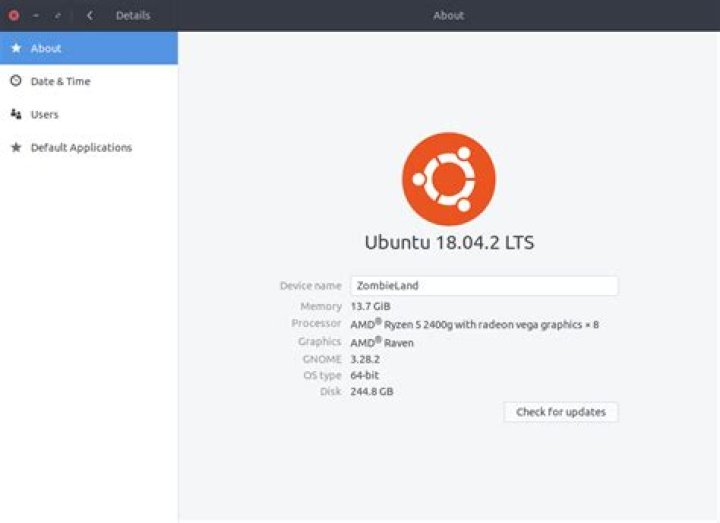
Specs -
CPU - Ryzen 5 2400G
Motherboard - MSI B450 gaming plus
RAM - Corsair Vengeance 8GB x 2
I am Using two displays - HDMI && DVI
I installed ubuntu 18.04 and it shows only 13.7GB ram out of 16GB
And When I use only one ram stick it shows 5.8 GB out of 8GB
I was on windows and there RAM was 14+GB
sudo dmidecode -t memoryOutput
# dmidecode 3.1
Getting SMBIOS data from sysfs.
SMBIOS 2.8 present.
Handle 0x000F, DMI type 16, 23 bytes
Physical Memory Array Location: System Board Or Motherboard Use: System Memory Error Correction Type: None Maximum Capacity: 256 GB Error Information Handle: 0x000E Number Of Devices: 4
Handle 0x0016, DMI type 17, 40 bytes
Memory Device Array Handle: 0x000F Error Information Handle: 0x0015 Total Width: Unknown Data Width: Unknown Size: No Module Installed Form Factor: Unknown Set: None Locator: DIMM 0 Bank Locator: P0 CHANNEL A Type: Unknown Type Detail: Unknown Speed: 2133 MT/s Manufacturer: Unknown Serial Number: Unknown Asset Tag: Not Specified Part Number: Unknown Rank: Unknown Configured Clock Speed: Unknown Minimum Voltage: Unknown Maximum Voltage: Unknown Configured Voltage: Unknown
Handle 0x0018, DMI type 17, 40 bytes
Memory Device Array Handle: 0x000F Error Information Handle: 0x0017 Total Width: 64 bits Data Width: 64 bits Size: 8192 MB Form Factor: DIMM Set: None Locator: DIMM 1 Bank Locator: P0 CHANNEL A Type: DDR4 Type Detail: Synchronous Unbuffered (Unregistered) Speed: 2133 MT/s Manufacturer: Unknown Serial Number: 00000000 Asset Tag: Not Specified Part Number: CMK8GX4M1D3000C16 Rank: 1 Configured Clock Speed: 1067 MT/s Minimum Voltage: 1.2 V Maximum Voltage: 1.2 V Configured Voltage: 1.2 V
Handle 0x001B, DMI type 17, 40 bytes
Memory Device Array Handle: 0x000F Error Information Handle: 0x001A Total Width: Unknown Data Width: Unknown Size: No Module Installed Form Factor: Unknown Set: None Locator: DIMM 0 Bank Locator: P0 CHANNEL B Type: Unknown Type Detail: Unknown Speed: 2133 MT/s Manufacturer: Unknown Serial Number: Unknown Asset Tag: Not Specified Part Number: Unknown Rank: Unknown Configured Clock Speed: Unknown Minimum Voltage: Unknown Maximum Voltage: Unknown Configured Voltage: Unknown
Handle 0x001D, DMI type 17, 40 bytes
Memory Device Array Handle: 0x000F Error Information Handle: 0x001C Total Width: 64 bits Data Width: 64 bits Size: 8192 MB Form Factor: DIMM Set: None Locator: DIMM 1 Bank Locator: P0 CHANNEL B Type: DDR4 Type Detail: Synchronous Unbuffered (Unregistered) Speed: 2133 MT/s Manufacturer: Unknown Serial Number: 00000000 Asset Tag: Not Specified Part Number: CMK8GX4M1D3000C16 Rank: 1 Configured Clock Speed: 1067 MT/s Minimum Voltage: 1.2 V Maximum Voltage: 1.2 V Configured Voltage: 1.2 V
1 Answer
May want to check the "Integrated Graphics Setting" in Peripherals (I have Gigabyte motherboard, your settings may be different on MSI) on your BIOS. This setting controls the amount of RAM allocated to the GPU on the 2400G, when set to auto on my motherboard, it allocates around 2 GB of Ram. When all the overhead is taken into account I have about 13.9 GB left from my 2x8 (16 Gb) Ram. If you have a dedicated GPU unit separate from the 2400G, you can force the Ram to be smaller through this BIOS setting. On my rig, I have found that "Auto" on the Integrated Graphics Setting gives the best overall performance, as I do not have a separate Video Card.
1

