Shrew Soft VPN fail to attach key daemon
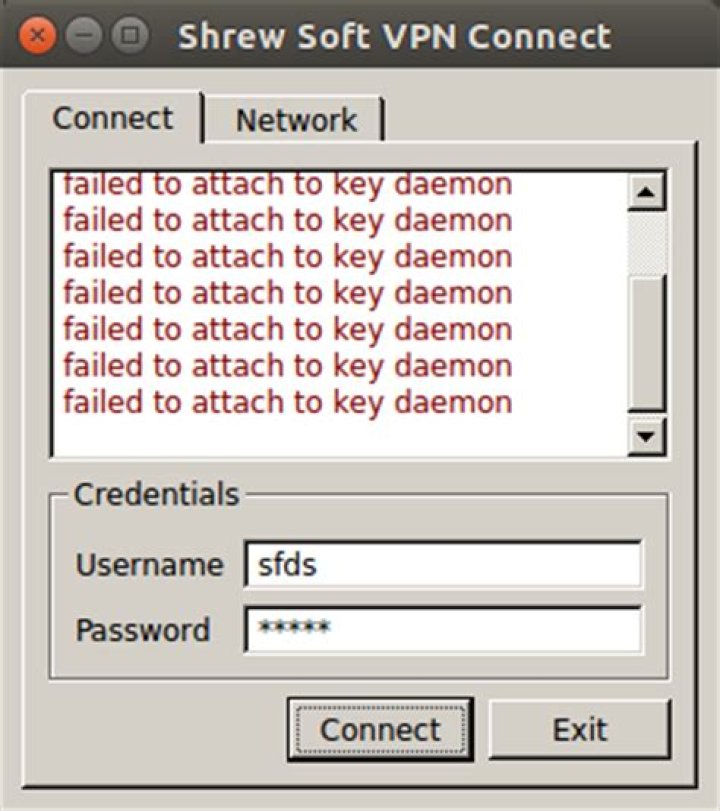
I'm trying to use Shrew Soft to connect to my school VPN. But as you can see here, it says
failed to connect to key daemon
I searched for the solution and people who use Shrew Soft Trace Utility and easily solved this on Windows OS as seen here.
Yet, I don't know how to solve this on Ubuntu 14.04.
Also, is there a substitute application for Shrew Soft VPN for Ubuntu? Thanks!
14 Answers
You can always check it if it's running by using the following command:
pgrep iked
if you get a result, it means the process is running
if not run the below command:
sudo /usr/sbin/iked
it starts service
I had the same problem. I found out that iked service was not running. I solved it by opening a terminal emulator and issued the command:
sudo /var/tmp/ike/script/linux/iked startI later found out that the Shrew installation on Ubuntu does not add this script to start up at all (shame on the guys and girls from Shrew ;-)). To do this yourself do the following:
In a terminal issue the command:
sudo nano /etc/rc.localType your root password and add the following line just before the last line (which normally says exit 0)
/var/tmp/ike/script/linux/iked startSave and close it.
Next time you restart your computer the service will be active and the error should never bother you again.
On Ubuntu 20.04, enable iked on startup by creating a systemd unit file:
sudo nano /etc/systemd/system/shrewvpn.servicewith the contents:
[Unit]
After = network-online.target
Wants = network-online.target
[Service]
Type = oneshot
RemainAfterExit = yes
ExecStart = /usr/sbin/iked
[Install]
WantedBy = multi-user.target
Enable your service on startup by issuing:
systemctl enable shrewvpnand start it in the current session using:
systemctl start shrewvpnLook in services.msc, I'm assuming that one of the Shrewsoft services isn't running. Should have two or 2 of them(shrewsoft IKE Daemon, Shrewsoft IPSEC Daemon, and Shrewsoft DNS Daemon). You may not have the last one.
1

