Script to display all terminal colors
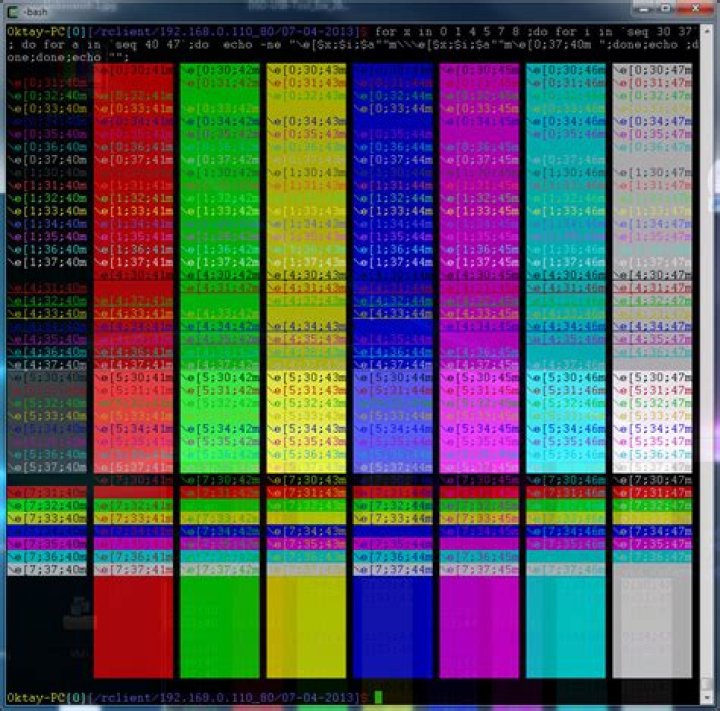
Throughout the internet I have seen many people with scripts that prints out a bunch of stuff in all the colors defined in ~/.Xdefaults. However when I try to use these, I always get error: Bad Substitution. Does anyone have a working script that does the same thing?
It should end up looking something like this:
10 Answers
Here is my solution with Bash only:
for x in {0..8}; do for i in {30..37}; do for a in {40..47}; do echo -ne "\e[$x;$i;$a""m\\\e[$x;$i;$a""m\e[0;37;40m " done echo done
done
echo ""
One-liner:
for x in {0..8}; do for i in {30..37}; do for a in {40..47}; do echo -ne "\e[$x;$i;$a""m\\\e[$x;$i;$a""m\e[0;37;40m "; done; echo; done; done; echo ""Here's a picture in Cygwin:
A simple one-liner that should work for most people.
msgcat --color=testYou can also use the colortest package.
Install it with this command:
sudo apt-get install colortestIt provides several commands which you can use, depending on how many colors you want:
colortest-16 colortest-16b colortest-256 colortest-8
Example output from colortest-16b:
Here's my version:
#!/usr/bin/env python
import sys
terse = "-t" in sys.argv[1:] or "--terse" in sys.argv[1:]
write = sys.stdout.write
for i in range(2 if terse else 10): for j in range(30, 38): for k in range(40, 48): if terse: write("\33[%d;%d;%dm%d;%d;%d\33[m " % (i, j, k, i, j, k)) else: write("%d;%d;%d: \33[%d;%d;%dm Hello, World! \33[m \n" % (i, j, k, i, j, k,)) write("\n")
This prints everything. If you want a nice table (that only shows style (0) and (1), normal and bold), you can use the -t or --terse argument:
The 'blink' style (5) doesn't work with gnome-terminal. ;-)
If this doesn't work for you, there's something else wrong. Please let us know once you've tested it.
3i made a little script for that :)
here's the important part:
colors=$@
for (( n=0; n < $colors; n++ )) do printf " [%d] $(tput setaf $n)%s$(tput sgr0)" $n "wMwMwMwMwMwMw
"
done
you pass it a number n and it spits out n colored lines along with each color's ansi index (you can use it in $(tput setaf <ansi-index>)).
here's a screenshot of the (partial) output:
i also got this one, which i forked (and slightly modified) from twerth:
#!/usr/bin/env bash
echo -e "\033[0mNC (No color)"
echo -e "\033[1;37mWHITE\t\033[0;30mBLACK"
echo -e "\033[0;34mBLUE\t\033[1;34mLIGHT_BLUE"
echo -e "\033[0;32mGREEN\t\033[1;32mLIGHT_GREEN"
echo -e "\033[0;36mCYAN\t\033[1;36mLIGHT_CYAN"
echo -e "\033[0;31mRED\t\033[1;31mLIGHT_RED"
echo -e "\033[0;35mPURPLE\t\033[1;35mLIGHT_PURPLE"
echo -e "\033[0;33mYELLOW\t\033[1;33mLIGHT_YELLOW"
echo -e "\033[1;30mGRAY\t\033[0;37mLIGHT_GRAY"
… which, in my current theme, shows:
Recently wanted to find that script that many people are refering myself. It's from the tldp.org Bash Prompt HOWTO - . The script is authored by Daniel Crisman.
It outputs exactly the same as on the pic from the question. The script itself:
#!/bin/bash
#
# This file echoes a bunch of color codes to the
# terminal to demonstrate what's available. Each
# line is the color code of one forground color,
# out of 17 (default + 16 escapes), followed by a
# test use of that color on all nine background
# colors (default + 8 escapes).
#
T='gYw' # The test text
echo -e "\n 40m 41m 42m 43m\ 44m 45m 46m 47m";
for FGs in ' m' ' 1m' ' 30m' '1;30m' ' 31m' '1;31m' ' 32m' \ '1;32m' ' 33m' '1;33m' ' 34m' '1;34m' ' 35m' '1;35m' \ ' 36m' '1;36m' ' 37m' '1;37m'; do FG=${FGs// /} echo -en " $FGs \033[$FG $T " for BG in 40m 41m 42m 43m 44m 45m 46m 47m; do echo -en "$EINS \033[$FG\033[$BG $T \033[0m"; done echo;
done
echo
This question is actually a top result when I search on how to display color codes in a terminal. So I wanted to give justice and give what the OP exactly was looking for. I do remember the screenshot is somewhat familiar. At first, I thought it was from Gogh however it's a bit different. I then realized it's exactly the same script being used in iTerm2 colors.
Lucky enough, they added a comment on where it originally came from
I'm posting the script for reference, taken from iTerm2 with original credits:
#!/bin/bash
#
# This file echoes a bunch of color codes to the
# terminal to demonstrate what's available. Each
# line is the color code of one forground color,
# out of 17 (default + 16 escapes), followed by a
# test use of that color on all nine background
# colors (default + 8 escapes).
#
# Copied from
T='gYw' # The test text
echo -e "\n 40m 41m 42m 43m\ 44m 45m 46m 47m";
for FGs in ' m' ' 1m' ' 30m' '1;30m' ' 31m' '1;31m' ' 32m' \ '1;32m' ' 33m' '1;33m' ' 34m' '1;34m' ' 35m' '1;35m' \ ' 36m' '1;36m' ' 37m' '1;37m'; do FG=${FGs// /} echo -en " $FGs \033[$FG $T " for BG in 40m 41m 42m 43m 44m 45m 46m 47m; do echo -en "$EINS \033[$FG\033[$BG $T \033[0m"; done echo;
done
echo
Here's the script in action:
This is my solution. It prints all 225 colours in bash:
for colour in {1..225} do echo -en "\033[38;5;${colour}m38;5;${colour} \n"
done | column -xRefer That will print the following output with formats like BOLD ,UNDERLINE , Highlighting and colors.
This is a modified version of the TLDP script here. It shows standard colors and vivid colors (codes 90-97 and 100-107).
#!/bin/bash
# Show available terminal colours.
# Heavily modified version of the TLDP script here:
#
print_colors(){ # Print column headers. printf "%-4s " '' ${bgs[@]} echo # Print rows. for bold in ${bolds[@]}; do for fg in ${fgs[@]}; do # Print row header printf "%s;%s " $bold $fg # Print cells. for bg in ${bgs[@]}; do # Print cell. printf "\e[%s;%s;%sm%s\e[0m " $bold $fg $bg "text" done echo done done
}
# Print standard colors.
bolds=( 0 1 )
fgs=( 3{0..7} )
bgs=( 4{0..8} )
print_colors
# Print vivid colors.
bolds=( 0 ) # Bold vivid is the same as bold normal.
fgs=( 9{0..7} )
bgs=( 10{0..8} )
print_colors
Example output:


