Run a cron job on the first Monday of every month?
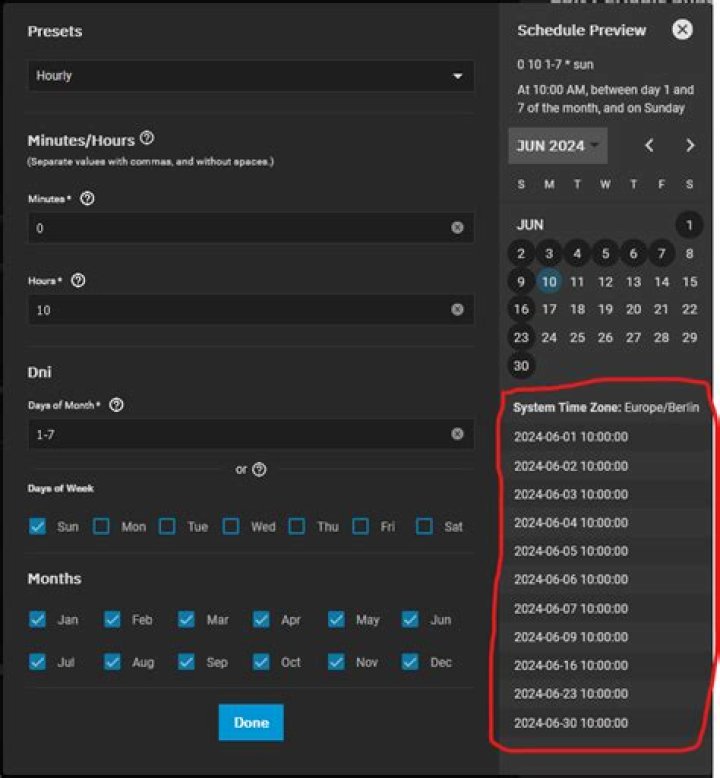
I'd like to run a job from cron at 8.30 on the first Monday of every month. The cron Wikipedia page says
While normally the job is executed when the time/date specification fields all match the current time and date, there is one exception: if both "day of month" and "day of week" are restricted (not "*"), then either the "day of month" field (3) or the "day of week" field (5) must match the current day.
(my emphasis)
Does that mean I can't do the first Monday of the month, I can only do the first (or whatever) day of the month? I can't think of a way round it.
214 Answers
You can put the condition into the actual crontab command (generic way):
[ "$(date '+%u')" = "1" ] && echo "It's Monday"if your locale is EN/US, you can also compare strings (initial answer):
[ "$(date '+%a')" = "Mon" ] && echo "It's Monday"Now, if this condition is true on one of the first seven days in a month, you have its first Monday. Note that in the crontab, the percent-syntax needs to be escaped though (generic way):
0 12 1-7 * * [ "$(date '+\%u')" = "1" ] && echo "It's Monday"if your locale is EN/US, you can also compare strings (initial answer):
0 12 1-7 * * [ "$(date '+\%a')" = "Mon" ] && echo "It's Monday"Replace the echo command with the actual command you want to run. I found a similar approach too.
I have a computer with locale on Spanish, so, this approach isn't working for me because mon changes to lun
Other languages would fail as well, so, I did a slight variation on the accepted answer that takes out the language barrier:
0 9 1-7 * * [ "$(date '+\%u')" = "1" ] && echo "¡Es lunes!"I find it easier when there's no need to handle day numbers.
Run First Monday of month:
0 2 * * 1 [ `date '+\%m'` == `date '+\%m' -d "1 week ago"` ] || /path/to/commandi.e. if the month 1 week ago is not the same as the current month then we are on the 1st day 1 (= Monday) of the month.
Similarly, for the Third Friday
0 2 * * 6 [ `date '+\%m'` == `date '+\%m' -d "3 weeks ago"` ] || /path/to/commandi.e. if the month 3 weeks ago is different to current month then we are on the 3rd day 6 (= Friday) of the month
1I have scheduled a job to run on the 4th Monday of every month at 4:00 PM as follows:
0 16 22-28 * Mon [ "$(date '+\%a')" == "Mon" ] && touch /home/me/FourthMonOfMonth.txtSince I interpret my cron statements using php and js, I can't use bash. Finally I found that it is in fact possible with just cron:
0 30 8 * 1/1 MON#1Hope this helps someone else. Regardless, I wish you all a beautiful day. :-)
1As far as I know it is NOT possible using only crontab, however one can use a wrapper function to pick the correct day from a "first seven days of month" contab entry; see this from entry.
The wrapper script would be
#! /usr/bin/ksh
day=$(date +%d)
if ((day <= 7)) ; then exec somecommand
fi
exit 1
and you would need to run it (assuming it is called wrapper.sh and globally available) using the crontab entry
0 0 * * 1 wrapper.shOn Solaris 10 I had to format the condition as follows:
[ `date +\%a` = "Sat" ] && echo "It's Saturday"You can try running cronjob for first seven days of month and let it execute only on Monday.
30 8 * * 1 [`date +\%d` -le 07] && <job>Above should work for you.
1I recommend to use
"$(/bin/date '+%\w')" = "1"instead of
"$(date '+\%a')" = "Mon"to avoid locale problem.
I made a general solution for this kind of problems, it works for first, second, third..... last weekday of the month.
You can use it like this:
30 06 * * Mon run-if-today 1 "Mon" && echo "First Monday"
30 06 * * Thu run-if-today 3 "Thu" && echo "Third Thursday"
30 06 * * Sun run-if-today L "Sun" && echo "Last Sunday"
The script run-if-today check for both the weekday and the desired week date range, if both match then it returns 0, otherwise 1.
Check the code here.
I believe this solves the problem more elegantly:
30 8 1-7 * 1 /run/your/job.shThis usage should be most universal and avoids the locale issue.
[ `/bin/date +\%u` -eq 1 ]the first Monday of the month at 6am would look like this in /etc/crontab
00 6 1-7 * * root [ `/bin/date +\%u` -eq 1 ] && /run/yourjob.shI needed the same result, but wanted to use pure cron. I hope this improves on the accepted answer.
For me I needed it to run the First Monday of each month at noon.
So this should run: At Noon, in the first 7 days of the month, on a Monday: 0 12 1-7 * 1
10 9 1-7 * 1 * This will work for every monday of every month.
1

