Run a .bat file silently?
I have a .bat file I am using to control the volume of my monitor using DDC/CI. I was using nircmd to run it silently, but as of the newest version of Windows 10, that no longer works.
Below is my batch file:
title CmmVolume
nircmd.exe win hide ititle "CmmVolume"
cmm.exe /ChangeValue Primary 62 %12 Answers
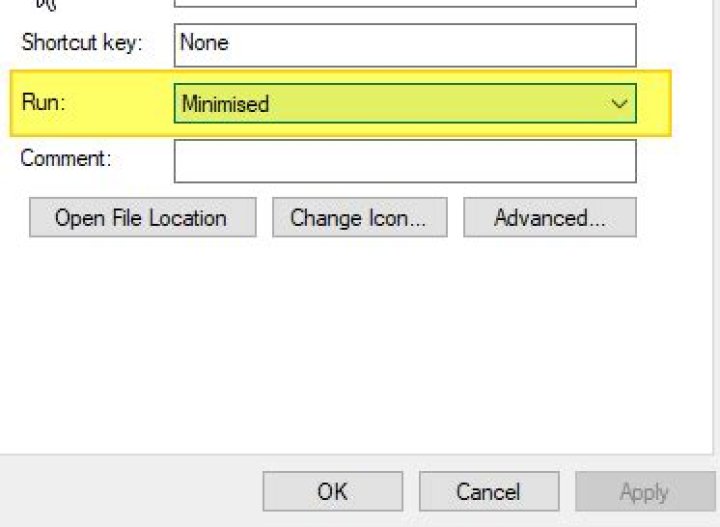
What you can do is run your batch file minimized, which gives virtually the same effect:
Create a shortcut to the batch file.
Right-click the shortcut and choose Properties.
In the Properties dialog, locate the
Rundropdown and choose Minimized.
Your bat should attend to some elementary points that are missing and that possibly this would be causing the execution to fail, but anyway, in my tests the adjustments listed below worked perfectly:
1. Enter the folder of your bat "%~dp0"
2. Apply the full path to all executable files
3. using the latest version of NirCMD on Windows 10
4. Replace ititle to stitle
@echo off && title <nul
>nul taskkill /F /FI "WindowTitle eq "CmmVolume" 2>nul
cd /d "%~dp0" && title CmmVolume
"C:\Users\ecker\Downloads\Nircmd\Nircmd.exe" win hide stitle "CmmVolume"
>>"%~dp0\log.log" echo\"c:\add\full\path\to\cmm.exe" /ChangeValue Primary 62 %1
>"%tmp%\VBS_play.vbs" echo\CreateObject("Wscript.Shell"^).Run "wmplayer /play /close ""%windir%\Media\notify.wav""", 0, False
wscript "%tmp%\VBS_play.vbs" & timeout /t 1 >nul & del /q /f "%tmp%\VBS_play.vbs"
Obs.: The vbs for execution/play audio and the log are for verification of execution in hidden/background mode...


