Remap Bluetooth headset button on Windows 10?
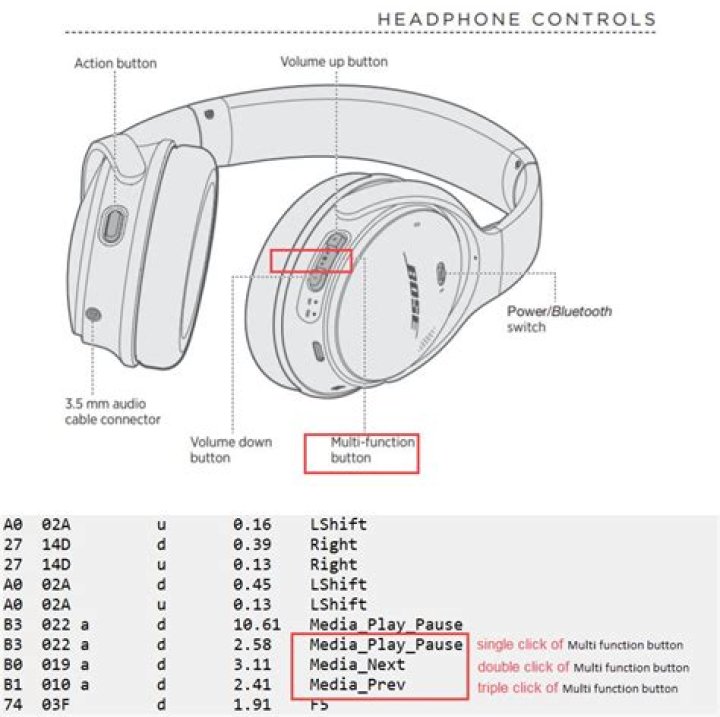
I have Bose QC 35 II and I am trying to get the Multifunction button to mute/unmute calls in MS Teams. For the purpose I will be using AutoHotKey, but in order to do that I need to capture the message this button is sending to Windows, so I can remap it to keyboard short cut. There is ready to use script here for the purpose:
The question is how can I capture the message it sends to Windows?
I have tried using AHKHID as described here.
This script - Example 1 lists quite a few devices on my laptop:
As I could not identify which Usage Page and Usage should use, I tried them all in Example 2, which is supposed to capture the key presses. I have added all combinations of Usage Page and Usage and after each I was pressing the Multi Function button of the headset to try to invoke a message being sent. But to no avail - no messages are being captured.
I also tried Usage Page 12 and Usage 1 with RIDEV_INPUTSINK, but this also did not trigger a message.
Is there is a more reliable way to validate if the headset is sending messages to Windows and what are they?
2 Reset to default

