Regex to select only specific number of spaces
I am using notepad++ and I want to do a find & replace operation.
For example
- 4 number of spaces means 1 tab
- 6 number of spaces means 2 tabs etc.
In my file all the spaces are in the beginning of each line.
What is the regex I should use to find the exact number of spaces?
I want to replace the spaces with tabs (like single or double tabs based on 4 spaces or 6 spaces)
Note: The file is a classification file which explains that 4 spaces is parent and 6 spaces is child and 8 spaces is a child of a child.
a Sample of the file :
Agriculture, forestry and fishing Crop and animal production, hunting and related service activities Growing of non perennial crops Growing of cereals (except rice), leguminous crops and oil seeds Growing of rice Growing of vegetables and melons, roots and tubers2 Answers
The syntax for regex to find out the number of spaces in the beginning of a line is
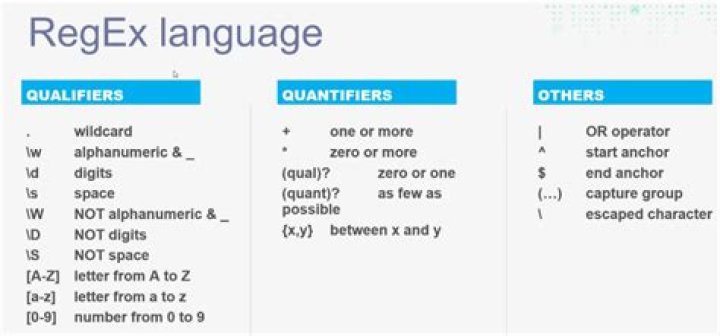
^(space_character){number_of_spaces_to_be_found}.For example, the following regex will find 4 spaces
^ {4}.In the replace box use
"\t"for replacing your find with one tab.
For two tabs use
"\t\t". 7
Perhaps the following pattern will do what you want (angle brackets surround the patterns):
Four leading spaces become one tab
Find: <^ {4}([^ ].*)$>
Replace: <\t\1>
Six leading spaces become two tabs
Find: <^ {6}([^ ].*)$>
Replace <\t\t\1>
Explanation
- As noted in other answers,
^matches the start of a line. - Also as noted, the curly bracket notation
{#}specifies a match for a specific number of repetitions. - The following content in square brackets,
[^ ], is a character class matching a single character that is not a space (square brackets define the character class; the leading^here indicates to invert the class). .*$matches any number of any kind of characters (possibly including newlines, depending on how the Regex engine is set up) up to the end of the line.- The parentheses surrounding
([^ ].*)indicate a defined group within the pattern, which is (hopefully, depending on the Regex engine in Notepad++) retrieved in the Replace expression by\1.


