RADIUS is ignoring request to authentication address
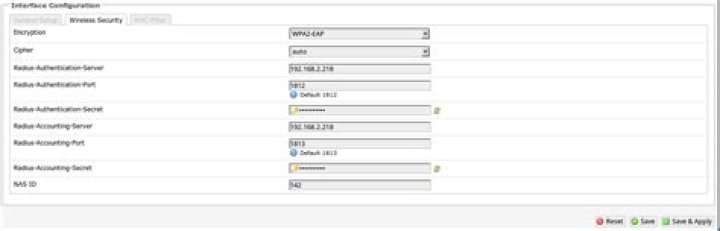
RADIUS only works if I use localhost. I can't use its IP address.
Output of: radtest user password localhost 1812 testing123:
Sending Access-Request of id 251 to 127.0.0.1 port 1812 User-Name = "user" User-Password = "password" NAS-IP-Address = 127.0.1.1 NAS-Port = 1812 Message-Authenticator = 0x00000000000000000000000000000000
rad_recv: Access-Accept packet from host 127.0.0.1 port 1812, id=251, length=33 Reply-Message = "Hello, user"
But if I want to use its IP address
Output of radtest user password 192.168.2.218 1812 testing123:
Sending Access-Request of id 28 to 192.168.2.218 port 1812 User-Name = "user" User-Password = "password" NAS-IP-Address = 127.0.1.1 NAS-Port = 1812 Message-Authenticator = 0x00000000000000000000000000000000
Sending Access-Request of id 28 to 192.168.2.218 port 1812 User-Name = "user" User-Password = "password" NAS-IP-Address = 127.0.1.1 NAS-Port = 1812 Message-Authenticator = 0x00000000000000000000000000000000
Sending Access-Request of id 28 to 192.168.2.218 port 1812 User-Name = "user" User-Password = "password" NAS-IP-Address = 127.0.1.1 NAS-Port = 1812 Message-Authenticator = 0x00000000000000000000000000000000
radclient: no response from server for ID 28 socket 3
Output of sudo freeradius -X:
Ignoring request to authentication address * port 1812 from unknown client 192.168.2.218 port 46554
Ready to process requests.
Ignoring request to authentication address * port 1812 from unknown client 192.168.2.218 port 46554
Ready to process requests.
The user entry in /etc/freeradius/users:
"user" Cleartext-Password := "password" Reply-Message = "Hello, %{User-Name}"The entry in clients.conf:
client 192.168.2.218 { ipaddr = 192.168.2.218 secret = testing123
}
2 Answers
To fix the problem I had to comment out client localhost { and ipaddr = 127.0.0.1 in /etc/freeradius/clients.conf.
Comment out the following
#client localhost { # Allowed values are: # dotted quad (1.2.3.4) # hostname (radius.example.com)
# ipaddr = 127.0.0.1 # OR, you can use an IPv6 address, but not both # at the same time.
# ipv6addr = :: # any. ::1 == localhost
and then add
client openwrt { ipaddr = 192.168.2.1 secret = testing123 require_message_authenticator = yesAllow port 1812 and 1813
sudo ufw allow 1812
sudo ufw allow 1813
Now my router uses radius.
I think the problems above were all firewall related. On Ubuntu 16.04 with iptables disabled, I had no trouble. I just added the net, restarted the daemon, and it worked.
client 192.168.0.0/16 { secret = your_pw_here shortname = reserved192
}
The output of sudo freeradius -Xwas rather long, but entertaining.
bottom line: Sending Access-Accept of id blah to ip-blah port blah


