PuttyCyg not starting correctly: "Must be connected to a terminal" error message
My computer is running Windows 7 SP1 64 bits with CygWin 64 bits installed and updated (as for 16-Nov-2014).
I need to run the screen program of CygWin in a text console.
I am trying PuttyCyg, a supposed mod of Putty compiled to run without flaws CygWin's terminals:
But I don't know how to start it for my usual bash shell. What should I put in command line?
The best results until now is:
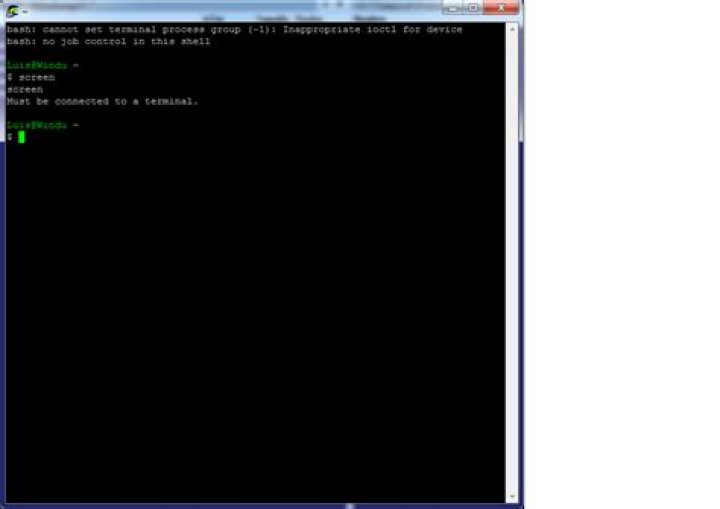
c:\CygWin\bin\bash.exe --login -iBut it yields me this result:
bash: cannot set terminal process group (-1): Inappropriate ioctl for device
bash: no job control in this shell
and it seems no terminal is running (?) :
Luis@Windu ~
$ screen
screen
Must be connected to a terminal.
Maybe the image gives you some more detail:
If I connect to c:\CygWin\bin\bash.exe -i I get:
bash: cannot set terminal process group (-1): Inappropriate ioctl for device
bash: no job control in this shell
Luis@Windu /cygdrive/h/Temporal/Probando/puttycyg-20101029
$ screen
screen
bash: screen: command not found
Luis@Windu /cygdrive/h/Temporal/Probando/puttycyg-20101029
$ /bin/screen
/bin/screen
Must be connected to a terminal.
Luis@Windu /cygdrive/h/Temporal/Probando/puttycyg-20101029
$
I have tested with no luck (the window vanishes, or get stuck):
c:\CygWin\bin\bash.exe --login
c:\CygWin\bin\bash.exe
-
--
According to the official docs it should be as easy as typing -.
What is the appropriate way to start PuttyCyg?
Reset to default

