Piix4_SMBus: 000:00:07.3: Host SMBus controller bus not enabled
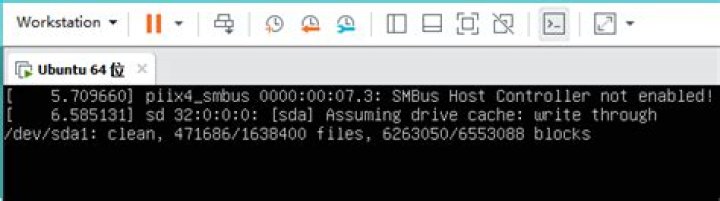
I have been using Ubuntu on VMware Player; today when I logged into VMware, it showed updates available for Ubuntu 15.xx. I allowed the updates and after downloading all the packages it restarted automatically, but never booted back. It is throwing messages like
Piix4_SMBus: 000:00:07.3: Host SMBus controller bus not enabled
failed to start /etc/rc.local compatibility
Please describe a way to fix it!
35 Answers
First, add this line in your vmx file to increase the boot time to 50s
bios.bootDelay = "50000"Start the VM, hold the left shift key down, then hit Enter.
In the grub menu, choose Advanced options for Ubuntu -> Recovery mode. Once the system boots, choose 'Root' to drop into a root shell.
In the root shell, enter the following commands
mount -o remount,rw /
nano /etc/modprobe.d/blacklist.conf
go down a few lines (almost anywhere) and enter the line
blacklist i2c-piix4Then press ctrl+o to save the file, and ctrl+x
Finally, enter the command
reboot
The method above didn't work for me on Ubuntu 16.10 and VMWare Workstation 12.5.1..
Boot into Ubuntu Recovery Mode --> drop into the root shell and open the kernel blacklist config file.
nano /etc/modprobe.d/blacklist.confThen add this line into the file and save.
blacklist intel_powerclampI found this solution from this post:
0At first, open *.vmx file from your VMware folder via notepad. Then add this line to the file and save it.
cpuid.1.eax = "0000:0000:0000:0001:0000:0110:1010:0101"The problem will be fixed.
2Although I'm late to the party, the solution to your other problem (failed to start /etc/rc.local compatibility etc., as described in the later comments to Charles Green's answer) is most probably (at least was for me), to wipe old, incompatible vmhgfs (shared VM disk) settings/module, since they break a couple of things.
First, the module doesn't load if there are version mismatch etc. Remove vmhgfs from /etc/modules, and now the init should run properly.
Secondly, if you added a fstab entry for your vmhgfs, systemd-fstab-generator generates a systemd startup task for it, also resulting in failed systemctl unit. Comment out or remove your vmhgfs line in fstab, and remove the relevant mnt-*.mount (e.g. mnt-vmhgfs.mount) files from your /run/systemd/generator. That should fix the 2nd part of the problem.
I was able to solve the problem by dropping into safe mode and running clean.
EDIT:
This was done holding shift when rebooting the VM. when in the grub go to "advanced options". Then in that menu run "clean"
1

