Outlook Rules: Specific Domain not working
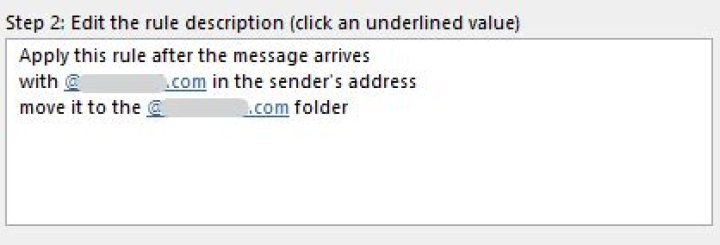
I am attempting to create a rule in the Outlook 365 App (Not OWA) to move all internal company emails from the inbox to an internal folder.
I have attempted the rules settings as follows:
Apply this rule after the message arrives
from @domain.com
move it to the folder Internal Emails folder
and stop processing more rules
Apply this rule after the message arrives
with @domain.com in the recipient's address
move it to the folder Internal Emails folder
and stop processing more rulesApply this rule after the message arrives
with @domain.com in the sender's address
move it to the folder Internal Emails folder
and stop processing more rulesNote 1: The rule works for external emails/mailservers that use our domain, but does not work internally.
Note 2: I can create individual rules for internal users and it works. However blanket domain rules do not work.
EDIT 24/11/2021
I have run the rule in OWA and it also did not work. I have attached a section of report I generated after running it. Note the only thing changed is the name of the domain, and the hex value that indicates the name of the domain.
<Rule Index="1" Name="mnl_Internal" Provider="RuleOrganizer" ExecutionSequence="10" Level="0" IsExtended="False" StateFlags="ExitAfterExecution" UserFlags="0"> <ProviderData><![CDATA[
00000000 01 00 00 00 00 00 00 00 07 40 77 4C BE E0 D7 01 |.........@wL....|
]]></ProviderData> <Restriction Type="Content" ContentFlags="SubString / 00000001" PropTag="SenderSearchKey / 000000000C1D0102" MultiValued="False"> <Property DataType="Binary / 0102"> <Value><![CDATA[
00000000 45 58 41 4D 50 4C 45 2E 43 4F 4D 2E 41 55 |EXAMPLE.COM.AU |
]]></Value> </Property> </Restriction> <Actions> <Action Type="OP_MOVE" UserFlags="00000000" FolderName="Internal Emails"> <FolderEntry><![CDATA[
00000000 00 00 00 00 DE 49 BD 39 5E E1 D7 4E 86 CB EC A5 |.....I.9^..N....|
00000010 24 66 CF 08 01 00 E6 A6 C9 4C BE 4D C2 44 94 DF |$f.......L.M.D..|
00000020 D6 FA BB E3 A3 3F 00 00 01 A5 CA 8B 00 00 |.....?........ |
]]></FolderEntry> <StoreEntry /> </Action> </Actions> </Rule>1 Answer
To further confirm the problem, please provide the following information:
- What's the type of your account(POP/IMAP/Exchange)?
- And does other users in your organization can create and apply the same rule?
According to my test on my Outlook client 365 version(version2110(Build 14527.20234 click-to-run)), the rule created to move the emails from the internal domain to a specific folder can work successfully. What's the version of your Outlook? (File > Office Account > About Outlook). Please make sure you have upgraded your Outlook to the latest version.
Considering the current data file or profile may be damaged, it is suggested that you could try to create a new profile(control panel>mail>show profile>add) and do the same test to check if there are some differences.
In addition, antivirus software may conflict with outlook. It is suggested that you could temporarily close your antivirus software and restart outlook to check whether this issue still exists.
4

