Network folder access denied after setting "Allow" permissions to folder for Group
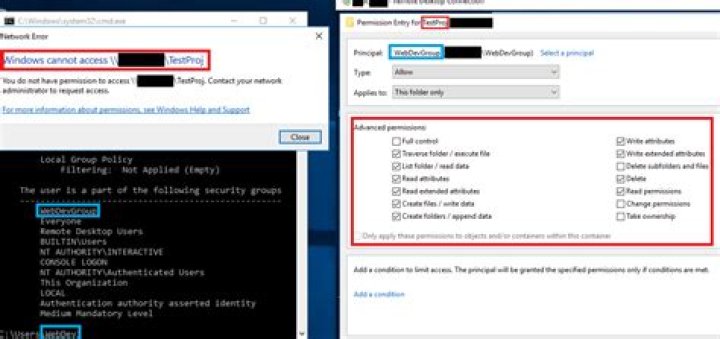
The folder TestProj is a shared folder at the root of a host server's E:\ drive. I made a new group called WebDevGroup with the user WebDev inside it. I assigned WebDevGroup the permissions to the TestProj folder below. Despite these permissions, I cannot open the folder when logged in as WebDev.
How can I [successfully] grant users in WebDevGroup Allow permissions to specific network folders?
What I Googled & tried:
- I ensured there was not a shared folder in the hierarchy above
TestProjthat I needed to additionally grantWebDevaccess to.- (Even so, I still logged into the host server and additionally granted
WebDevGroupexplicitAllowpermissions to the host server'sE:\drive anyway, just in case.)
- (Even so, I still logged into the host server and additionally granted
- I logged out/logged into the
WebDevaccount multiple times. - I deleted the local
WebDevuser profile so the PC would rebuild the profile on next login. - I logged in as
WebDevon a different PC & attempted to accessTestProj. - I ran
gpresult /r /scope:user(seen below) to confirmWebDevwas a member ofWebDevGroup. - I applied the
Allowpermissions toWebDevdirectly instead of toWebDevGroup.
1 Answer
If you're accessing the folder through its share-name, permissions on the share are also required.
They are found in the Properties of the share, Sharing tab, Advanced Sharing.
1

