MS Excel - Add / Subtracting time in 0000 format
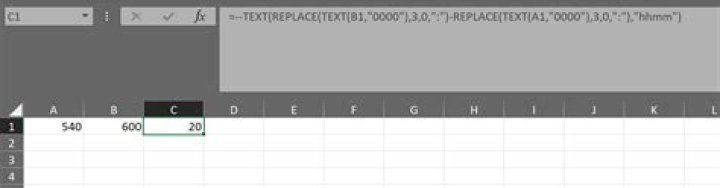
I am trying to subtract time on Excel.
My company uses a 24hr time format (0500,0600, 1250, 1300 etc.)
I'm trying to calculate the time difference between 2 cells:
| A1 | B1 |
|------|------|
| 540 | 600 |
| | |
In cell C1 I have =B2-A2 and it returns 60 which is technically correct but 5:40AM - 06:00AM is 20 minutes.
How do I go about making excel correctly calculate the time for me using this format?
2 Answers
Convert the numbers to time, subtract and convert the time returned to the correct format:
=--TEXT(REPLACE(TEXT(B1,"0000"),3,0,":")-REPLACE(TEXT(A1,"0000"),3,0,":"),"hhmm")There are several methods you can use to solve this issue. Shown below is one of them, to convert number to Hours and Minutes:
Formula in cell
E57:=TEXT(TEXT(INT(B57/100)/24+MOD(B57,100)/1440,"hh:mm")-TEXT(INT(A57/100)/24+MOD(A57,100)/1440,"hh:mm"),"hh:mm")
Adjust cell references in the formula as needed.


