Motherboard will not power on by front panel pins
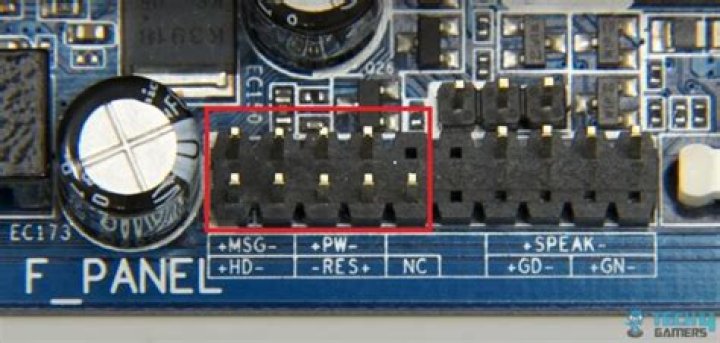
Things I have done:
- Replaced PSU
- Bridged power pins with screw driver
- Re-flashed BIOS in OS (have working OS installed)
There are two ways of powering it on
- Motherboard can be turned on by bringing the green and the black wires on the PSU then it will pass post.
- WAKE on LAN will turn on the motherboard after safe shutdown.
I want to be able to turn on my motherboard by the front panel pins.
Everything works part from the front panel power switch.
Motherboard is:intel dg33m06
updateBringing pins 5 and 6 turns on the mother board.
1 Answer
Looking at the actual pin outs
You are resetting your system. by bridging 7 and 8.
You'd need a little troubleshooting to see where's the issue.
Bridge 5 and 7 to ensure 5 is grounded and can trigger off a reset, then try bridging 6 and 5. If it dosen't turn on the system with 6 and 5, it gets tricky. Its possible there's damage somewhere and you'd want to visually inspect your motherboard for damage, and if so, try to bypass that. In many cases I'd try tracing what connects to pin 6, but motherboards are complex, multi-layered boards so that would be tricky.
Its possible though that the trace to that pin is damaged, or there's a short somewhere
Unfortunately at this point you'll need to break out the multimeter to really check. Grounds should be connected so check continuity between 5 and 8
2

