Missing apple keyboard layout: English (International, Macintosh)
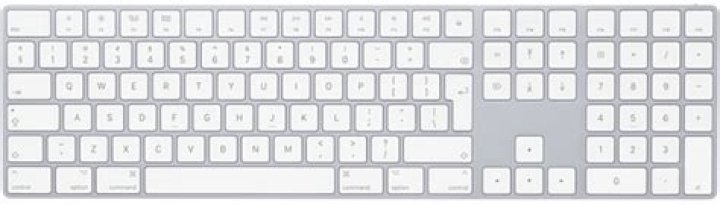
The "International Keyboard" layout from the apple magic keyboard seems to be missing, there is an international layout for UK, but the plain international layout is not there:
English (International, Macintosh) <- missing layout
* This is the layout that is missing
as a reference here are the other macintosh keyboard layouts, whereas the closes keyboard layout is the English (UK, Macintosh) but the shift + 3 combination is incorrect.
English (UK, Macintosh)
Shift + 3: should be#but instead is£
English (Macintosh)
- The keys left of
Zshould bebackquote keyand~ - The keys left of
1should be§and±
English (UK,Intl., Macintosh)
- Multiple
shift + numberkeys are incorrect - Multiple
super + numberkeys are incorrect
2 Answers
I feel stupid for not figuring this out myself but here's how to get the English (Macintosh) layout back for your keyboard on Ubuntu 20.04 (late 2020 earlier 2021 since it worked fine earlier in 2020).
[1] Open Settings > Region & Language > Input Sources
[2] On the right under Input Sources click the + icon
[3] Click the ellipsis
[4] Click your preferred language ...
UPDATE FEB 2021
... at this moment it's important to pay attention as it happens so fast you will miss it. Once you've selected your preferred language the list of languages updates and becomes a list of kb layouts. If you close the modal you'll only get the language, but if you scroll down the list you'll see the mac layout.
[5] .. then select "English (Macintosh)" as your preferred layout
[6] You're done
When 20.04 was initially released we had to search for English (Macintosh) after clicking the ellipsis in step [3] above. It seems that keyboard layout is now grouped within the selected keyboard source.
By that I mean after I selected English (Canada) a new list appeared from which I could select a keyboard layout for English (Canada).
4Looks like you need to make the adjustment suggested in this Ask Ubuntu answer. Once you have done that, the English (Macintosh) keyboard layout probably fits your physical keyboard.
Edit:
If editing /etc/default/keyboard proved to not be persistent, the explanation might be that there is only one user on your system and that the change was silently wiped out when you added or removed input sources in Settings.
If you set it by running this command:
gsettings set org.gnome.desktop.input-sources xkb-options "['apple:badmap']"instead it ought to stay.
(Looks like you hit a known inconsistency where GNOME and XKB don't play well together. That's a bug, and the issue is mentioned in passing in the discussion at bug #1892014.)
4

