Microsoft Surface Book - Detach screen while off or unpowered?
Does anyone know if the screen of the new Microsoft Surface Book will be able to be detached WHILE:
- It is powered off / in hibernation,
- Sleeping,
- It is frozen or hanging,
- Both batteries (in keyboard and screen) are completely discharged and no power is available for the locking mechanism.
From the hands-on demo videos, it looks like it needs power to unlock the screen while the button is held down and then a desktop message will let you know when it is ready to be pulled off.
EDIT: Thanks to @FosterMcLaughlin, he reports it is possible to detach while powered off (1), so I assume in (2) and (3) will still detach. The only question now is if it is still possible in (4).
EDIT: After visiting a store and seeing the display model, I asked the staff and according to him, if both batteries are discharged completely, you cannot detach the screen as the magnetic locks require power to release. All questions answered! Thanks everyone!
28 Answers
I own one and YES you can detach when the book is powered off PROVIDED the tablet section is not completely flat otherwise you will get a error stating there is not enough charge in the tablet to detach.
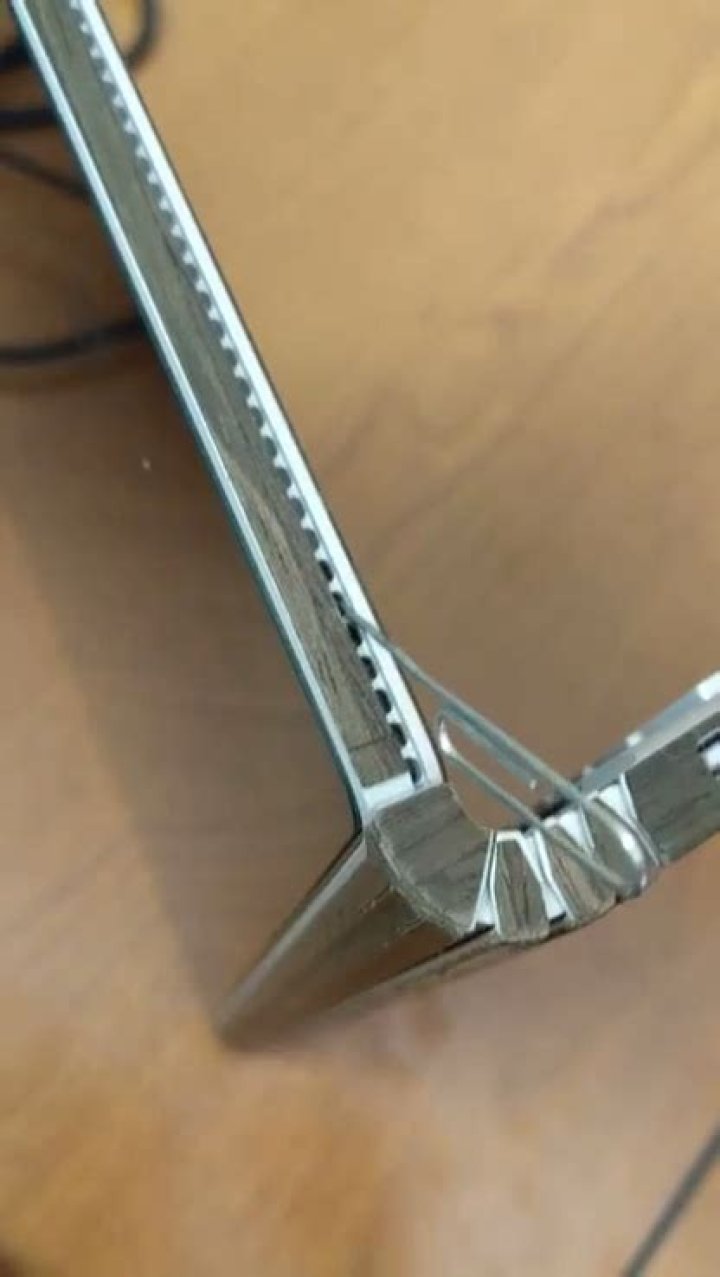
1On the left and right side there are holes for a manual release. Just insert a paper clip into the 6th fan-hole from the bottom on each side.
2I confirm that inserting paper clip into the 6th fan-hole from the bottom on each side works (my tablet battery was not charging and there was no other way of getting the tablet off the base). You need to insert the paper clip about 2-3 cm deep, at an angle of about 45 degrees upwards. The paperclip will push a lever that is held back by a spring, so you need to apply some small force and push it in by about 0.5cm.
1you cannot detach it while off. It requires power to release the connector posts. It also will not disconnect if there is less than 10% battery power. So as for being off, frozen or discharged thats a NO.
2Even if both batteries are discharged completely, it's possible to detach the screen manualy, with a paper clip. Just put the paper clip, play around and while you play around try detaching it by lifting it. It's on the left side, around the forth and sixth hole.Just like in this picture.
1It's the sixth hole from the hinge and you have to angle the paper clip away from the hinge. also the paper clip goes in 3/4" (further than I would have guessed). The release lever is spring loaded and you can feel the spring giving way as you press.
Surface book 2 - Paper Clip @ 45 Degree Angle based on Post from BOB
---> WORKS, detached SB2, now charging as the keyboard dock is bad.
0I am playing around with the surface book right now and, yes you can detach the screen while it is off.
4

