MATLAB: Growing an array and logical indexing
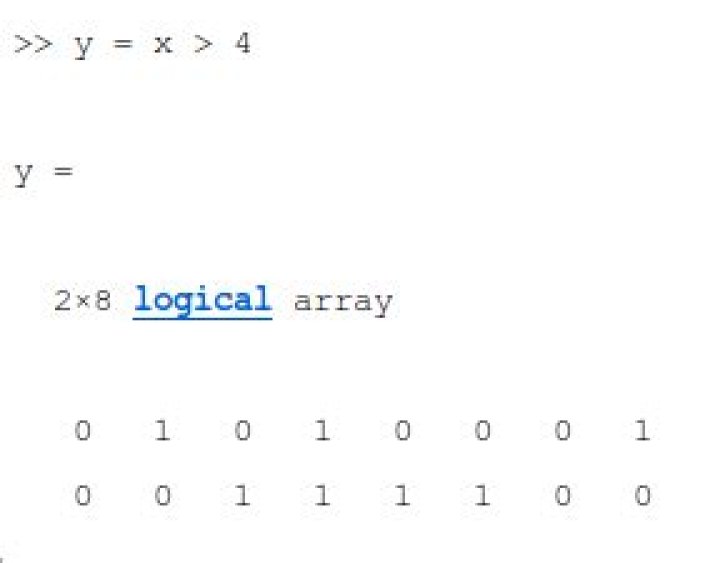
I create the following array in MATLAB:
Now I find which elements of x are greater than 4:
So far so good. Now I create an array of length 8:
And now I execute this command:
I am very confused as to what just happened. What is this command doing? Why is z now an array of length 15?
1 Answer
What do you want to accomplish with the command z(y)=1?
You will get some strange behaviour since z and y have different sizes. You should check the array indexing documentation on MATLAB to better understand what is happening and how array indexing works.
Because you provided your code as an image, i will use a different x matrix to explain what is happening. Following your steps, we have:
rng('default'); % set random number generator, so you will get the same matrix as me
x=randi(10,[2 8]); % create random matrix
> x =
>
> 9 2 7 3 10 2 10 9
> 10 10 1 6 10 10 5 2
Find elements greater than 4: y=x>4 % creates y
> y =
>
> 2×8 logical array
>
> 1 0 1 0 1 0 1 1
> 1 1 0 1 1 1 1 0
Create array of length 8 (?). (Lets skip this step)
...Assign:
z(y)=1
> z =
>
> 1 1 0 1 1 0 0 1 1 1 0 1 1 1 1
What is happening here? MATLAB will use the array y as the indices to the newly created variable z. To better understand the difference between the indices 0 and 1 of the y array and the assignment =1 to the z array, lets just change the value to 2:
z(y)=2
> z =
>
> 2 2 0 2 2 0 0 2 2 2 0 2 2 2 2
Now it should be easier to understand. First, because z does not exist in the workspace (or, in your case, because the number of elements in z is smaller than the number of elemnts in y), MATLAB will create this variable. The size of the variable is the same as the size of the y array with nonzero elements:
y(:)'
> ans =
>
> 1×16 logical array
>
> 1 1 0 1 1 0 0 1 1 1 0 1 1 1 1 0
Notice y is a logical array. With that in mind, what the assignment z(y)=2 does is to assign 2 to every true element of the array y. Because the last element is 0, MATLAB will disregard this element and will not include it in the array. Think of it as if MATLAB would do:
z(logical([1 1 0 1 1 0 0 1 1 1 0 1 1 1 1 0]))=2The last comment is how MATLAB changes the 2×8 y array to a 1×16 array. Check this other documentation on array indexing, to better understand Indexing with a Single Index. When you call all elements of array as in y(:), MATLAB uses the linear index instead of the array index. We call it row-wise operation, because MATLAB will consider each column as an 1d array and concatenate them altogether, as explained here , with the visual aid:


