macOS - "No space left on device" with 250GB available after Catalina upgrade
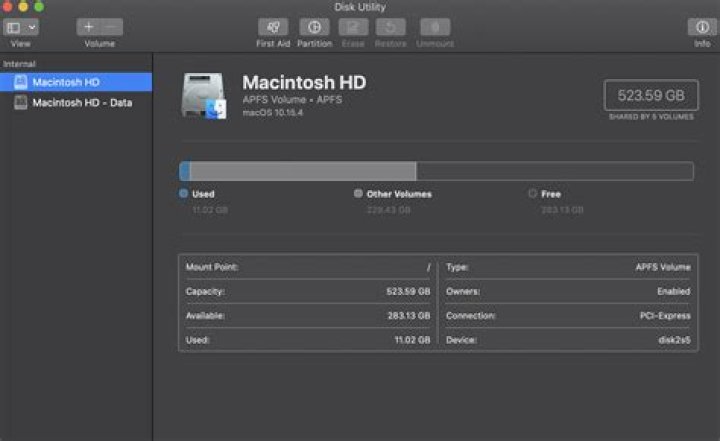
My iMac is behaving strangely after upgrading to Catalina (10.15.4), even though my system says I have over 290GB available:
I'm getting error and warning messages regarding disc space, No space left on device when trying to build a golang binary, Chrome says Failed - Disc Full when trying to download anything, etc.
I did find this reddit thread explaining that Catalina mounts a new volume, which probably has something to do with it.
diskutil list /dev/disk0 (internal, physical): #: TYPE NAME SIZE IDENTIFIER 0: GUID_partition_scheme *24.0 GB disk0 1: EFI EFI 314.6 MB disk0s1 2: Apple_APFS Container disk2 23.7 GB disk0s2 /dev/disk1 (internal, physical): #: TYPE NAME SIZE IDENTIFIER 0: GUID_partition_scheme *500.1 GB disk1 1: EFI EFI 209.7 MB disk1s1 2: Apple_APFS Container disk2 499.9 GB disk1s2 /dev/disk2 (synthesized): #: TYPE NAME SIZE IDENTIFIER 0: APFS Container Scheme - +523.6 GB disk2 Physical Stores disk0s2, disk1s2 1: APFS Volume Macintosh HD - Data 218.0 GB disk2s1 2: APFS Volume Preboot 83.4 MB disk2s2 3: APFS Volume Recovery 528.1 MB disk2s3 4: APFS Volume VM 2.1 GB disk2s4 5: APFS Volume Macintosh HD 11.0 GB disk2s5
Has this happened to anyone else, and how do I solve it?
- Disc Utility Screenshots:


