Issue with broken and missing icons after upgrading to Ubuntu 20.04
I upgraded from Ubuntu 19.10 to 20.04 and have not found a solution to these desktop bugs and don't know how to report them.
See images below, icons for all system applications are missing, including minimize, maximize, and close icons for all applications, period. The top right menu at first was invisible but now only shows the airplane mode icon and clicking the background right below it activates it, as if the menu had the wrong dimensions. Full screen applications can't be closed with the close window icon because you'll be clicking the menu instead.
I have reinstalled gnome, gnome-shell, gnome-session, and other packages to no avail.
Running this command gsettings get org.gnome.desktop.interface icon-theme gives me:
GLib-GIO-Message: 12:10:31.048: Using the 'memory' GSettings backend. Your settings will not be saved or shared with other applications.
(process:5770): GLib-GIO-WARNING **: 12:10:31.048: unknown schema extension 'd'
(process:5770): GLib-GIO-WARNING **: 12:10:31.048: unknown schema extension 'd'
'Adwaita'
icons missing
and
invisible menu
2 Answers
Your icon theme is Adwaita, which seems to be corrupted. Reinstall the adwaita-icon-theme package by running the following command in Terminal
sudo apt-get install --reinstall adwaita-icon-themeand then reboot your system.
Also you may use GNOME Tweaks to change the icon theme to something different from Adwaita.
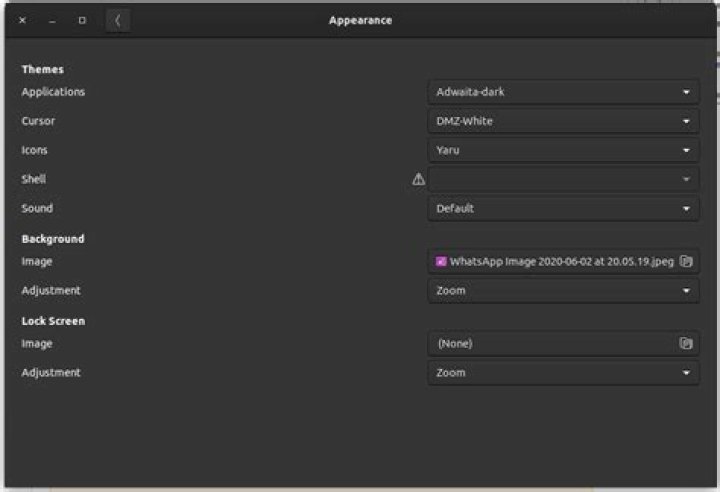
Had the same problem here. I just set the original theme using Gnome Tweaks as shown on imagem bellow and when I hovered Activities or Settings menu, it aligned automatically .


