“Invalid magic number, you need to load the kernel first” on an existent and previously working Ubuntu installation (not live USB issue)
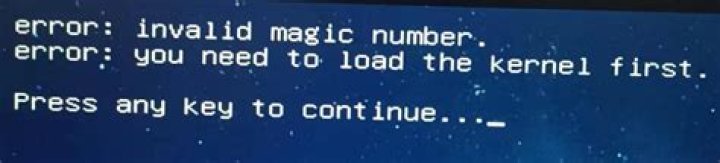
I installed Ubuntu 20.04 on a fresh SSD. This motherboard has other harddrives with, for example, windows on them. My installation went fine and I was working all day yesterday on this install. I can't recall for sure, but I believe I restarted a few times, for updates and the like, and booted back into Ubuntu 20.04 no problem. What I didn't do was ever launch back into windows until the end of the night. I shut the system down after that, and this morning tried to launch back into Ubuntu 20.04. I mention this because some of my research indicated Windows can sometimes mess with boot filesystems.
Note that the below issues all occurred identically both before and after I ran fsck on the ssd from a temp Live Ubuntu thing, even though apparently fsck found a large volume of errors. Before fsck, the drive was unmountable in that Live Ubuntu, after, it was mountable, and I could grab some files I needed this morning.
If I try to select "Ubuntu" in my Grub menu, I get the error:
Error: Invalid Magic Number
Error: You need to load the kernel first
If I drop into the console, I can see my file system no problem.
ls (hd3,gpt2/)
lost+found/, boot/ ...etc
In my boot/, there is
efi/
grub/
System.map-5.4.0-26-generic
config-5.4.0-26-generic
initrd.img
initrd.img.old
memtest86+.bin
memtest86+elf
memtest86+_multiboot.bin
vmlinuz
vmlinuz.old
vmlinuz-5.4.0-26-generic
vmlinuz-5.4.0-48-generic <-- this is the one I'm trying to use
initrd.img-5.4.0-26-generic
config-5.4.0-48-generic
System.map-5.4.0-48-generic
initrd.img-5.4.0-48-generic
If I do file on these, I get weird results:
file (hd3,gpt2)/boot/vmlinuz-5.4.0-48-generic
error: invalid arch-independent ELF magic
file (hd3,gpt2)/boot/initrd.img-5.4.0-48-generic
error: invalid arch-independent ELF magic
At this point my potential research points have branched enough to make me think I should ask on stackexchange what next steps I can try. For example, the two most common ubuntu stackoverflow answers get the "invalid arch-independent ELF magic" directly from grub (or grub-rescue?) it seems. Also, every other "invalid magic number" answer on reddit and stackexchange involve Live CD type things running directly off a flashdrive, and the solution is always "use a different flash drive / installation creation tool."
Note that the above commands and responses were hand-typed so while I double checked I may have mis-typed something.
How can I boot into 20.04 again, ideally without re-installing or losing my files?
Experiments below:
I tried Live USB error "you need to load the kernel first" :
First answer doesn't work, if I do
linux /boot/vmlinuz-5.4.0-48-generic root=/dev/sdb2I get
error: invalid magic numberSecond answer doesn't work. I'm not in secure-boot mode.
The third answer didn't work, I've tried disconnecting all USB devices to no avail.
I saw some things online about EFI mode. In my grub menu, I see UEFI Firmware Settings as an option, I'm not sure if that indicates I'm in UEFI "mode" or not. Based on what I'm looking at in my bios menu, I believe I'm in UEFI mode.
I tried the most-given solution to invalid arch-independent ELF magic error (across various Stackexchange questions)
sudo mount /dev/sdb2 /mnt
sudo grub-install --root-directory=/mnt /dev/sdb2
Installing for i386-pc platform.
grub-install: warning: File system `ext2' doesn't support embedding.
grub-install: warning: Embedding is not possible. GRUB can only be installed in this setup by using blocklists. However, blocklists are UNRELIABLE and their use is discouraged.
grub-install: error: will not proceed with blocklists.
EDIT: I ran the oft-recommended boot repair tool, this is the output:
Now the error is
error: invalid magic number
alloc magic is broken at 0xb7855240: b779dc00
Aborted. Press any key to exit.

