IntelliJ invalid Maven location when switch OS
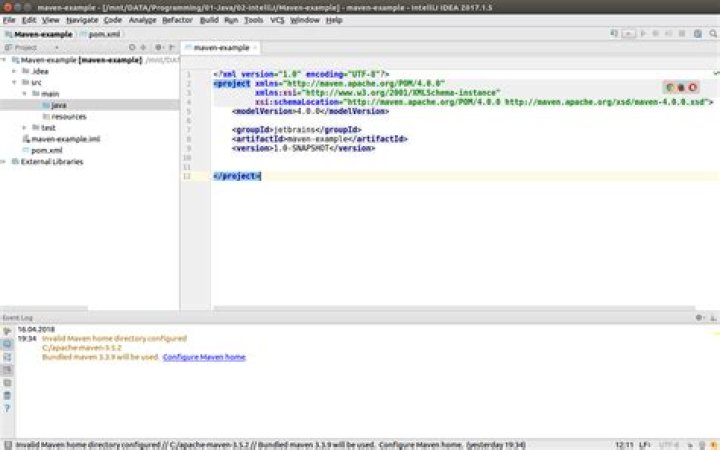
I have IntelliJ Idea Ultimate installed on both Windows 8.1 & Ubuntu 16.04 on the same laptop, but different partitions. If I'm using Windows and set up the maven directory to the installed one on Windows's local disk C, it works, but after I'll restart the computer on Ubuntu, when entering IntelliJ I get a notification saying Maven directory is invalid, because it somehow remains the one from Windows, despide I also have Maven installed on Ubuntu on a separate Ubuntu partition. Of course I can set the path for the Maven's location on Ubuntu, but I don't want to do this all the time I'm switching operating systems.
I'm not sure, does these two IntelliJ's (the one from Windows & the other one from Ubuntu) communicates somehow? I'm not having problems using Tomcat, for instance, which I also have on both Windows & Ubuntu.
Invalid Maven home directory configured
C:/apache-maven-3.5.2
Bundled maven 3.3.9 will be used. Configure Maven home.1 Answer
On your Linux OS, check the file permissions of the maven.jar file in the ../plugins/maven/lib folder. Pretty sure it should have execution rights for at least your user if not the group as well.
Seems like some of those maven jar files have not always been marked executable in the past when they should have been.
I think I found this beginning with IntelliJ 2016 and on.
You might try comparing the permissions of your personal install of maven with those "bundled" with IntelliJ to ensure they have the same permissions.
Also, make sure that the "program" files, and scripts, are executable. These are found in ../plugins/maven/lib/maven3/bin


