Installed Ubuntu as second OS - how to remove the old OS?
I had a Manjaro Linux installation which I later installed Ubuntu alongside of. I've now moved everything I want over to Ubuntu and would like to fully remove Manjaro from my disk and let my Ubuntu installation take the whole disk.
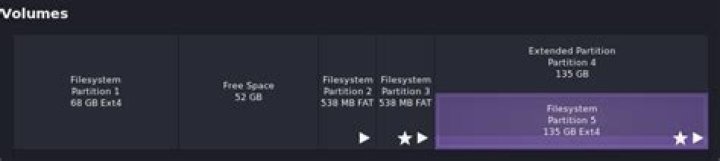
For reference, this is how GNOME Disks displays the current partitions:
Partition 5 is mounted at filesystem root, 4 seems to be a mirror of 5(?), 3 is mounted at /boot/efi, 2 is mounted as /media/user/blabla, and 1 is the old OS root directory.
My end goal is to have 5 be as large as possible (i.e. eat up the 68+52 GB that are unused atm), and still have a bootable system.
I know will have to boot into a live USB in order to move and resize my current partition, but I would really like to know how to safely remove all remnants of Manjaro from my system, and any steps I need to take to keep my system bootable.
Any help you have will be much appreciated!
1 Answer
There is always some risk when deleting and resizing partitions so take backups of anything you cannot afford to lose. As long as you have a working bootable live environment to get into you can fix any issues that could arise but that shouldn’t be necessary
To get rid of Manjaro just start GParted and delete partition 1. You can do that from Ubuntu without booting a live environment. Then update grub and Manjaro should effectively be gone.
You have MBR partitions which has a limit of 4 without using an extended partition. Partition 5 is inside partition 4. I know you don’t want to do this but you could reduce partition 5 and add a 6th partition. Then it would be apparent 4 contains 5 and 6.
You might want to:
- Delete partitions 1 and 2.
- Move partition 3 to the start of the drive
- Expand partition 4 to take up all the space
- Expand partition 5 to take up all the space inside partition 4.
Alternatively you could move partition 5 from being inside partition 4 with a copy paste operation in GParted and then get rid of partition 4. You would have to reduce the size of partition 5 temporarily to do this and possibly edit /etc/fstab to get it booting correctly.
1

