Installed 7zip. Not working. And when removing, it says to remove Fileroller as well
I installed 7zip today from software centre but it won't showed up in launch bar (side bar). I did a lot but failed to open 7zip "window" from any where. I clicked it in dash but then I was sent to software center showing that it is installed. I just don't know how to start it. Nor it is showing in right-click menu.
I actually wanted to open flareget which is in .tar.gz. Ubuntu's default archive opener isn't opening it and showing me this:
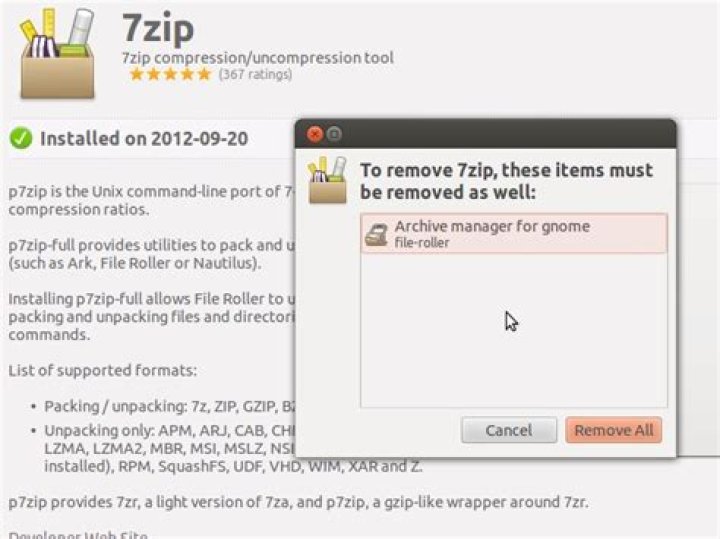
And if I try to remove 7zip, it's saying file-roller should also be removed:
What's going on and what's solution?
12 Answers
First of all, p7zip that you have installed is a command line tool -- it has no reason to appear in the sidebar. You run it from command line. It is an obscure little tool and in the fifteen or so years I use Linux I never had the need to install it.
Second: you definitely do not need p7zip to open tar.gz files; this is the standard archive / compression in Unix, virtually any Unix comes with tools provided to open and handle that files. .tar is the archive that has been compressed with gzip to get the .tar.gz file.
The error message that you are getting indicates that your file is broken; it was not completely downloaded. This is why gzip complains. p7zip will not help you, you need to download the file again.
Third, the problem with dependencies is another issue. I tried to repeat your procedure, and did not observe the same problem. However, if it is a matter of keeping p7zip (which is not large), I'd just keep it.
37z is just a plugin/addon for file-roller, when installed you can open most of the archives using file-roller. You can also install from cli like so sudo apt-get install p7zip-full
when right clicked on a file you can choose to compress it and also choose which format
from there you can choose 7z. When right clicked an archive file, just choose extract
if you really want to remove 7zip run this in the gnome-terminal sudo apt-get remove p7zip-full. Via software-center down below you get a checkbox option, next to it should be file-roller, uncheck it, then only 7zip will be removed.


