Importing CSV files into Excel using a macro
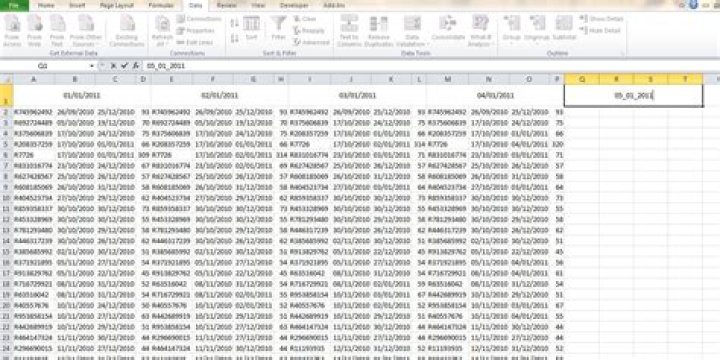
I want to develop a macro where in my Excel worksheet I type a date in a specific cell, and the macro will go into a folder containing text files. A database you could say. I want it to find the corresponding file name which is written as a date, put the data through a delimiter, and paste into the cells directly below where I originally put the date.
The folder will always be in the same place and the text files will all be formatted DD_MM_YYYY. And there cells below will always be empty
Some pictures to make what I'm asking easier to figure out.
1 Answer
This is more simple than you may think, because you can invoke the Text Import Wizard (or rather, you can use its functionality) from within a macro, there's no need to write a CSV parser or anything fancy like that.
In fact, all I've done with the macro below is to use the built-in record function, and then tweak it a little bit to meet you needs.
Using the Macro:
Backup your current Excel file, in case something goes wrong.
Change the definition of
folderin the macro to be the path containing all of your data files - make sure you include a trailing slash.Select the header cell of the columns, which must contain the name of a one of your files - including the file extension. You can edit this field after the data is loaded if you wish to remove the extension.
Run the macro.
Actions
It will take the file name from the current cell, look in the specified folder and open that file specified in the cell. Then it will import it as CSV, exactly one cell below the selected cell (when starting the macro).
As such, it will probably overwrite the cells below the selected cell when running the macro - caution is advised.
If the file isn't found, or some other error occurs, this will fail with a normal VBA error box, no friendly error messages.
Macro Code
Some of this can probably be trimmed - as said I get it from a recording rather than learning how to user QueryTables myself - but it won't hurt as it is, and seems to work reliably.
Sub LoadFromFile() Dim fileName As String, folder As String folder = "C:\Path\To\Your\Files\" fileName = ActiveCell.Value ActiveCell.Offset(1, 0).Range("A1").Select With ActiveSheet.QueryTables _ .Add(Connection:="TEXT;" & folder & fileName, Destination:=ActiveCell) .FieldNames = True .RowNumbers = False .FillAdjacentFormulas = False .PreserveFormatting = True .RefreshOnFileOpen = False .RefreshStyle = xlInsertDeleteCells .SavePassword = False .SaveData = True .AdjustColumnWidth = True .RefreshPeriod = 0 .TextFilePromptOnRefresh = False .TextFilePlatform = 850 .TextFileStartRow = 1 .TextFileParseType = xlDelimited .TextFileTextQualifier = xlTextQualifierDoubleQuote .TextFileConsecutiveDelimiter = False .TextFileTabDelimiter = False .TextFileSemicolonDelimiter = False .TextFileCommaDelimiter = True .TextFileSpaceDelimiter = False .TextFileColumnDataTypes = Array(1, 1, 1, 1) .TextFileTrailingMinusNumbers = True .Refresh BackgroundQuery:=False End With
End Sub

