I Have No IPTables
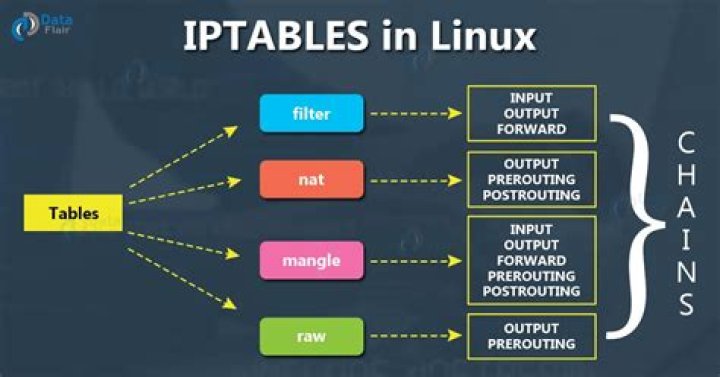
I have something really weird going on that I can't seem to find any reference to after a lot of googling. I seem to have no iptables. Not that the chains are flushed or that they are all ACCEPT rules or something, the tables themselves don't seem to exist. Here is what I mean:
The story is, my docker stopped working at some point in the last few months and I finally got around to fixing it. The error was being caused by the following command:
$ iptables -A DOCKER-ISOLATION-STAGE-1 -j RETURN
iptables: No chain/target/match by that name.
Which docker runs as part of its startup and which I tried to run manually to debug.
So then I started messing around trying to add different chains and rules in different places, and everything was giving that error. So finally I tried to just list everything
$sudo iptables -S
iptables: No chain/target/match by that name.
$ sudo iptables -L
iptables: No chain/target/match by that name.
$ sudo iptables --list
iptables: No chain/target/match by that name.
nothing. So I tried to look at each of the tables
# iptables -vL -t filter
iptables: No chain/target/match by that name.
# iptables -vL -t nat
iptables: No chain/target/match by that name.
# iptables -vL -t mangle
iptables: No chain/target/match by that name.
# iptables -vL -t raw
iptables: No chain/target/match by that name.
# iptables -vL -t security
iptables: No chain/target/match by that name.
More nothing, it's like the actual tables themselves are gone. Even something as simple as
# iptables -P INPUT ACCEPT
iptables: Bad built-in chain name.
doesn't work.
Has anyone seen this before? Is there any way to get the tables back?
My system is Ubuntu 18.10 with Kernel 5.1.8
Updates
I have since added all the iptables modules to my /etc/modules and rebuilt the initramfs. The modules are now loaded on boot but it didn't solve the problem.
I found that the iptables-save command does not error, but it also only prints the following:
# Generated by iptables-save v1.6.1 on Tue Jun 11 17:35:52 2019
*nat
COMMIT
# Completed on Tue Jun 11 17:35:52 2019
# Generated by iptables-save v1.6.1 on Tue Jun 11 17:35:52 2019
*mangle
COMMIT
# Completed on Tue Jun 11 17:35:52 2019
# Generated by iptables-save v1.6.1 on Tue Jun 11 17:35:52 2019
*raw
COMMIT
# Completed on Tue Jun 11 17:35:52 2019
# Generated by iptables-save v1.6.1 on Tue Jun 11 17:35:52 2019
*security
COMMIT
# Completed on Tue Jun 11 17:35:52 2019
# Generated by iptables-save v1.6.1 on Tue Jun 11 17:35:52 2019
*filter
COMMIT
# Completed on Tue Jun 11 17:35:52 2019
I also found that ip6tables appears to be working normally, its only iptables that is broken.
Next I tried running some of the iptables commands in verbose mode.
# iptables -S -vv
libiptc vlibxtables.so.12. 0 bytes.
Table `filter'
Hooks: pre/in/fwd/out/post = 7f68/9f6085dd/5616/9f60a8e0/5616
Underflows: pre/in/fwd/out/post = 36e4540/7fff/36e48e8/7fff/0
iptables: No chain/target/match by that name.
# iptables -N DOCKER-ISOLATION-STAGE-1 -vvIn verbose mode this commant doesn't complete, the output is huge. I tried dumping it to a file but I killed it when that file reached 8.5GB in size. The output is all repitions of the following pattern:
libiptc vlibxtables.so.12. 1032595540 bytes.
Table `filter'
Hooks: pre/in/fwd/out/post = 7ffe/92c0b5dd/55a7/92c0d8e0/55a7
Underflows: pre/in/fwd/out/post = 3d8c10f0/7ffe/3d8c1498/7ffe/3d8c2854
Entry 0 (0):
SRC IP: 0.0.0.0/0.0.0.0
DST IP: 0.0.0.0/0.0.0.0
Interface: `'/................to `'/................
Protocol: 0
Flags: 00
Invflags: 00
Counters: 0 packets, 0 bytes
Cache: 00000000
Target name: `' [0]
verdict=0
Entry 0 (0):
SRC IP: 0.0.0.0/0.0.0.0
DST IP: 0.0.0.0/0.0.0.0
Interface: `'/................to `'/................
Protocol: 0
Flags: 00
Invflags: 00
Counters: 0 packets, 0 bytes
Cache: 00000000
Target name: `' [0]
verdict=0
Hopefully this makes sense to someone, it's meaningless to me.
123 Answers
Searching on internet i found that is possible to restore iptables on Linux using the following command
iptables-restore < /root/working.iptables.rules
However there are some technical guides which suggest that if using kubernetes proxy iptables rules lost after restarting iptables+node.
The following files provides useful information about it:
I hope that can help!
1Have you tried manually reinstalling iptables?
./configure --prefix=/usr \ --sbindir=/sbin \ --disable-nftables \ --enable-libipq \ --with-xtlibdir=/lib/xtables &&
make
make install &&
ln -sfv ../../sbin/xtables-legacy-multi /usr/bin/iptables-xml &&
for file in ip4tc ip6tc ipq iptc xtables
do mv -v /usr/lib/lib${file}.so.* /lib && ln -sfv ../../lib/$(readlink /usr/lib/lib${file}.so) /usr/lib/lib${file}.so
done
make install-iptables
Drawn from here.
2This turned out to be a kernel config problem. Usually when I apply my patch a build a new kernel, I copy the config I was using from the previous version (in hindsight maybe a bad idea). Once I merged my config with the latest Ubuntu kernel config and rebuilt the kernel, my iptables output looked normal again.


