Hyper-V and WSL2 networks do not communicate
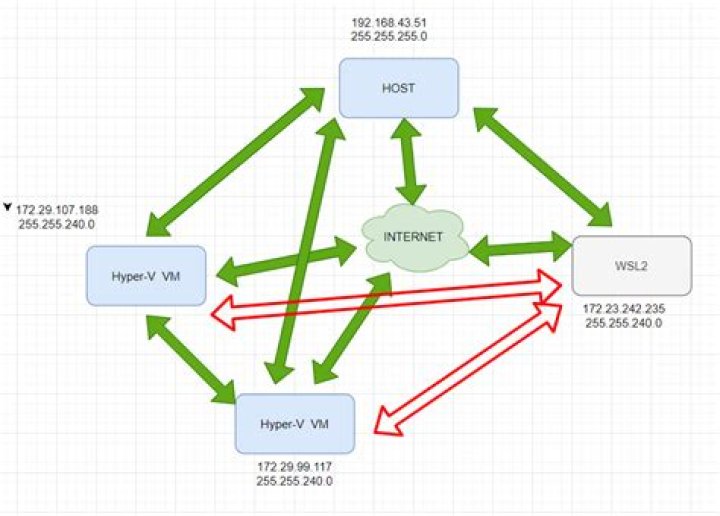
I have a Windows 10 Pro (version 20H2) computer with the following situation:
The Host, the Hyper-V VMs and WSL2 all have Internet access, they all can communicate each other but wsl2 and the VMs cannot (the red arrows).
My problem is that I cannot ping or ssh wsl2 from a VM and vice versa.
The Hyper-V VMs use the "Default Switch" vNet: 172.29.96.1, netmask: 255.255.240.0, conn type Internal
WSL2 uses "WSL" vNet: 172.23.240.1, netmask: 255.255.240.0, conn type: Internal
There is a third vNet, named "nat", I can see using "ipconfig" but that is not listed in Hyper-V virtual switch manager: 172.25.128.1, netmask 255.255.240.0, conn type: ?
Can anyone help me? Thanks
1 Answer
I eventually found a solution.
Basically all I need is to set up a port forwarding.
Have a look at here:


