How to use Amharic EZ+ keyboard layout in Ubuntu 14.04?
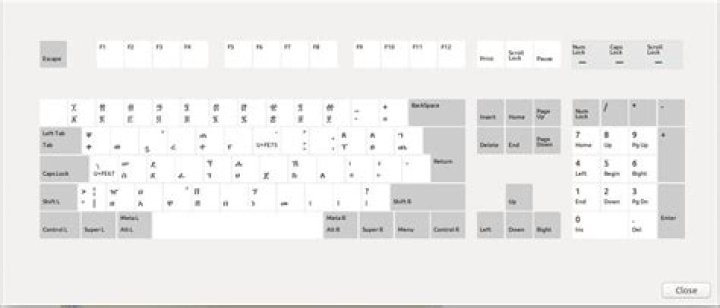
How do I use the previously available Amharic EZ+ keyboard layout in Ubuntu 14.04? The default keyboard for Amharic lacks the vowels or I just can't find them here is the keyboard layout that I have right now.
You can see the vowels are missing. I've tried to set the Sera as my keyboard option but I can't seem to get it to work, here is what I see when I run the ibus-setup application.
3 Answers
I found the answer to this question from the GNU/Linux Ethiopia Google Mailing list. One of our members, Teferra, gave out the answer a while back. The key is to add Amharic (sera (m17n)) input source in Text Entry options. To do this follow the instructions below:
- First install the m17n package,
sudo apt-get install ibus-m17n. - Then open dash (Super), and type Text Entry and choose to open that application. You will see the following window popup. There are several things you can do on this window but for our purposes we will only need to add Amharic (sera (m17n)) input source.
- Add the Amharic (sera (m17n)) input source using the
+button indicated there.
Once you've done that, the Amharic Keyboard would be available as usual.
In addition to the above answeer given. Let me give you how you configure and install that in your lates Ubunut 16.04 at current time of writing.
On dashboard menu click and type lanaguge support as follow.
select on language support window and a dialog box will appear.
select install / remove lanauges button
a dialog will show you a list of lanagues support packs which are installed and select amahric and press apply.
N.B to do this easily you need to first tick add download languge support check box when isntalling ubunut or upgrading it using. do-dist-upgarde on terminal.
Also if you dont remeber this setting on installation . pretty easy that Ubunut will ask you to download lanague packs when opening lanague supprt windows on above stage.
Next and finall is setting up your amahric keyboard below.
Goto your desktop menu icon that says [EN] if you are default on english langue keyboard layour. click the icon and select Text Entry Setting.
Now select add + button. select amharic. and press keyboard icon. you will see this.
Now enjoy your amahric keyboard !!
with love <3
For Ubuntu 18.04 and later users, after installing you can simply add it in region and languages section from settings.


