How to set a thumbnail to a video file on Windows 10
I have a mkv file and I would like to set a thumbnail. I would like this thumbnail to be an image of a random moment of this video, as Windows did for my other videos. If I am not clear enough, I’ll explain again. I don’t want to chose the thumbnail myself, I want Windows to automatically set the thumbnail. At the moment, the icon is the VLC cone.
2 Answers
The reason the icon is displaying as VLC, is because that is the default application to run that file.
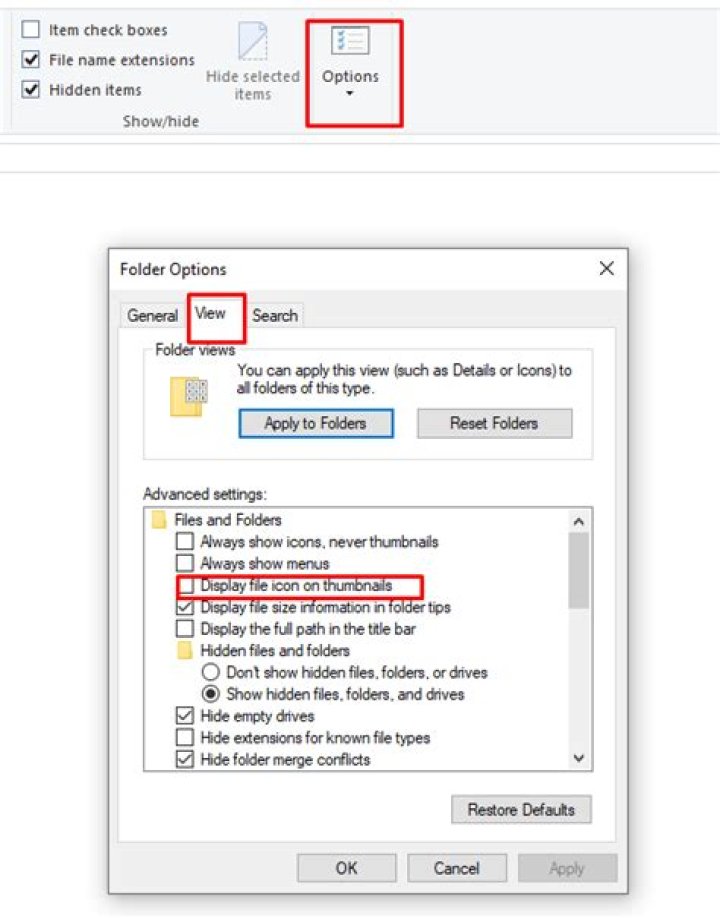
To change this navigate to Options -> View -> Uncheck: Display file icon on thumbnails
Next, if the file preview is small it will show the icon so you need to enlarge the file preview by navigating to View -> Layout.
or as a shortcut, use ctrl + mouse scroll
You want to also uncheck: Always show icons never thumbnails.
You might want to clear thumbnail cache:
- Open your File Explorer. Click This PC.
- Right-click the drive where you Windows is installed.
- Select Properties. Then select Disk Cleanup.
- Check the box next to Thumbnails. Make sure all other options are unchecked.
I followed this tutorial . You have to download Icaros and click on activate thumbnails once you opened it.


