How to properly select Country region for 5GHz channel on TP-Link dongle
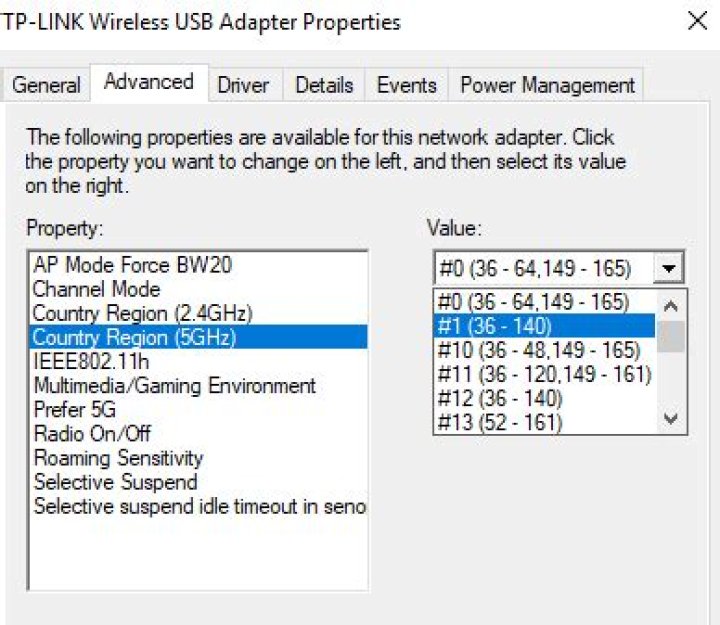
This question may not be limited to TP-Link. With my USB WiFi dongle, I currently only see 2.4GHz wifi, however it does support 5GHz and there is a setting for it in hardware properties:
In my router (MicroTik), I found this info:
Additionally, a bit lower it says:
- Channel: 5785/20-eeCe/ac
I did also search some variations of this question, but I'm not wiser. I found a table on wikipedia that is probably relevant, but it mentions almost all options as viable indoors in Europe.
How to chose the correct region? Do I need to try them all? Does it depend on region or router settings?
1 Answer
First, your router must have the correct country specified, and the 'frequency-mode' setting must be changed to 'regulatory-domain'. (Note that this is per-interface, so 2.4 GHz and 5 GHz radios each have their own settings.)
In your case the frequency (5.785 GHz, i.e. channel 157) is within the "U-NII 3" band, which is permitted in USA and UK but seems to have power/range restrictions in Europe (note the "SRD" indication).
(It would probably work with option #0 or #10 or #11, but only the channels are indicated – it's not clear whether they all allow 40 MHz mode, 80 MHz mode, etc.)
However, not only do 5 GHz rules vary considerably between regions (some bands only allowed in USA but not EU, or the other way around), Mikrotik RouterOS actually ignores them entirely by default. Whereas most firmwares tend to select conservative defaults when the country is unknown (to maximize compatibility), RouterOS does the opposite and allows every possible frequency that it's physically able to use – which can go way beyond the legally permitted "free-for-all" ISM range.
So if the router doesn't have country correctly set, it could end up going as low as 4920 MHz, or as high as 6040 MHz (going well into the "licensed" range) – both extremes will be unsupported by many WiFi devices regardless of what region you try to select in the dongle settings.


