How to permanently configure keyboard
I use a Turkish keyboard which I have converted to English (Ubuntu server 12.04). My problem is that the single quote is not present on the keyboard but is instead represent by a comma in midair. To fix this I use the command
sudo dpkg-reconfigure keyboard-configurationThe problem is each time I shutdown, changes are reverted thus every time I start the system, I have to type that command. I was thinking of making it a cronjob but I`m sure there can be another way to make the changes permanent.
06 Answers
using sudo dpkg-reconfigure keyboard-configuration will change your keyboardlayout just for this session.
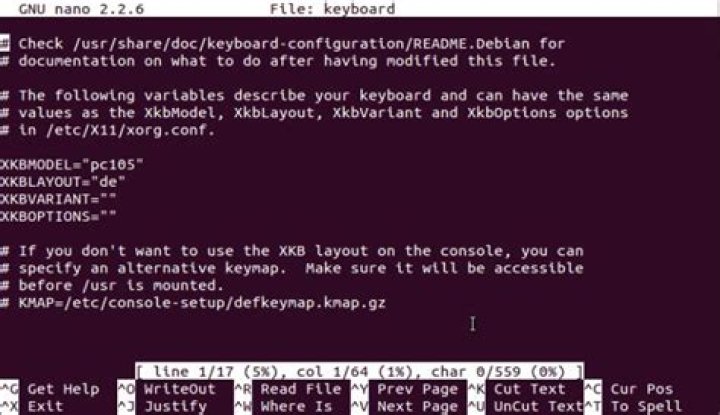
go for sudo nano /etc/default/keyboard there you can change your keyboard settings.
Find the line :
XKBLAYOUT="xx"You can change layout and kboptions as well as your model and the kbvariant.
Just put in tr for Turkish
on older ubuntu versions you could go for dpkg-reconfigure console-setup and make permanently changes here. but for server 12.04 I guess it should be in the keyboard file.
The keyboard settings are stored in /etc/default/keyboard file. It's provided by the keyboard-configuration package, and other packages use this information in order to configure the keyboard on the console or in X Window System.
You can change your keyboard settings using:
dpkg-reconfigure keyboard-configuration
service keyboard-setup restartTo change it permanently via the terminal run this:
For US:
L='us' && sudo sed -i 's/XKBLAYOUT=\"\w*"/XKBLAYOUT=\"'$L'\"/g' /etc/default/keyboardFor French:
L='fr' && sudo sed -i 's/XKBLAYOUT=\"\w*"/XKBLAYOUT=\"'$L'\"/g' /etc/default/keyboardFor German:
L='de' && sudo sed -i 's/XKBLAYOUT=\"\w*"/XKBLAYOUT=\"'$L'\"/g' /etc/default/keyboardand so on...
Tested on Ubuntu 16.04 64 bit.
To change it temporarily you can use setxkbmap mylayout...
# US
setxkbmap us
# French
setxkbmap fr
# German
setxkbmap de
In terminal mode, you need to use loadkeys instead of setxkbmap
# US
loadkeys us
# French
loadkeys fr
# German
loadkeys de
I was having the same problem since last year and i was everytime setting the keyboard layout when starting the system. I tried all methods but none helped except one which i found helped me :)
- Go > Applications > System tools > Preferences > Startup Application
- Add new
- Name: Default Keylayout
- Command: setxkbmap us
- Save
Restart the system :)
1For console-only instances e.g. servers, you should install the console-data package with apt-get install console-data and then set it up with dpkg-reconfigure console-data.
I tried all of the above on an Ubuntu 16.04 and only the temporary solution setxkbmap xx did it for me so I manually included it in the .bashrc profile: sudo nano ~/.bashrc and then type setxkbmap xxreplacing xx with yor language code


