How to install pyzmq for iPython Notebook in a Python 3 virtual environment?
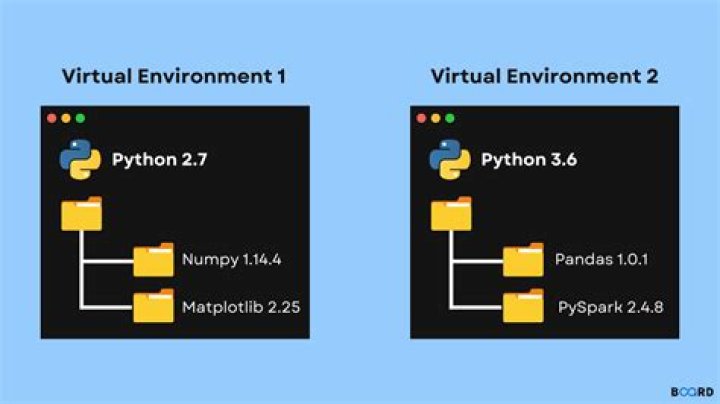
I wanted to use iPython Notebook in Python 3 on Ubuntu 14.04. Because I have both Python 2.7 and Python 3.4 installed on my system--and for other implementation-specific reasons--I decided to use a Python virtual environment (with virtualenv). Very little has been written about this topic so far...
- How to install Python package pyzmq properly?
- How to install the latest IPython notebook in Ubuntu 12.04?
These reports don't specifically handle Python 3 and virtual environments. Furthermore, the the official and various unofficial guides to installing iPython Notebook don't deal with this use case, either.
The main problem I encountered is with the ZMQ library. To install the library and the Python bindings system-wide I used apt-get:
sudo apt-get install libzmq3 libzmq3-dev python3-zmqBut when I tried pip install ipython[notebook], either inside or outside my virtualenv, the installation would fail with exit status 1 and the warnings:
Warning: Detected ZMQ version: 4.0.4, but pyzmq targets ZMQ 4.0.5.
Warning: libzmq features and fixes introduced after 4.0.4 will be unavailable.
I confirmed in Synaptic Package Manager that the libzmq3 package for Ubuntu is only version 4.0.4. As an alternative, I tried this fix, having pyzmq build its own libzmq dependency:
pip install pyzmq --install-option="--zmq=bundled"But this failed because it couldn't find a certain header file:
 buildutils/initlibsodium.c:10:20: fatal error: Python.h: No such file or directory #include "Python.h" ^
compilation terminated.
error: command 'x86_64-linux-gnu-gcc' failed with exit status 1
Next, I built libzmq version 4.0.5 from source.
wget
tar -xzvf zeromq-4.0.5.tar.gz && rm zeromq-4.0.5.tar.gz
cd /usr/local/zmq/zeromq-4.0.5
./configure
make -j 6
sudo make install
No problems encountered. After this, I tried to install pyzmq in my virtual environment with:
easy_install pyzmqI also tried building pyzmq from source. In both cases, I could see from the output that the proper ZMQ version (4.0.5) was detected, but the installation failed because I didn't have Cython installed (a not-well-documented dependency for building pyzmq, in my opinion).
After installing Cython for Python 3...
sudo apt-get install cython3I tried installing pyzmq again with pip and with easy_install both inside and outside the virtual environment; it still didn't work. This message was delivered despite cython3 being installed:
Fatal: Cython-generated file 'zmq/backend/cython/_device.c' not found. Cython >= 0.16 is required to compile pyzmq from a development branch. Please install Cython or download a release package of pyzmq.And this file structure:
$ ls -l zmq/backend/cython/
checkrc.pxd context.pxd __init__.py _poll.pyx utils.pxd
constant_enums.pxi context.pyx libzmq.pxd rebuffer.pyx utils.pyx
constants.pxi _device.pyx message.pxd socket.pxd _version.pyx
constants.pyx error.pyx message.pyx socket.pyx
2 Answers
The "Python.h" error message indicates that you are missing the python3-devpackage, which you need to build any Python extensions (Python modules written in C), which you can get with:
apt-get install python3-devTo get up and running from scratch:
apt-get update && apt-get install python3-dev python3-pip build-essential libzmq3-dev
pip3 install virtualenv
virtualenv -p $(which python3) myenv
source myenv/bin/activate
pip install pyzmq
python -c 'import zmq; print(zmq.zmq_version())'
# 4.0.4
The installed packages:
- build-essential: compilers and headers for building things on Ubuntu.
- python3-dev: headers (Python.h) needed for compiling any Python extensions.
- libzmq3-dev: the libzmq library and its headers. This is optional, but recommended. PyZMQ will link against libzmq found on the system if it can, otherwise it will build libzmq itself as a Python extension.
- pip, virtualenv: Shouldn't be needed, but used to workaround Ubuntu's bug that breaks
python3 -m venv.
I ran the above commands in a base ubuntu:14.04 docker container to verify that they are sufficient to successfully build pyzmq in a virtualenv.
Finally, I considered installing iPython Notebook system-wide (outside a virtual environment). I had previously tried just install pyzmq system-wide but this wasn't enough.
When I considered install iPython Notebook outside the virtual environment, I realized, "How do I get pip to discriminate between Python 2.7 and Python 3.4?" I went searching and found this excellent answer. In fact, it turns out my central problem was related to pip. I installed the pip corresponding to my Python 3 version:
sudo apt-get install python3-setuptools
sudo easy_install3 pip
And after that, installing both pyzmq and ipython[notebook] worked perfectly inside my virtual environment:
pip3.4 install pyzmq
pip install ipython[notebook]
I accidently used pip instead of pip3.4 for ipython[notebook] but it works anyway:
(my-virtual-env)me@computer:~$ pip freeze
Jinja2==2.7.3
MarkupSafe==0.23
certifi==14.05.14
ipython==2.3.1
pyzmq==14.4.1
tornado==4.0.2
However, using pip3.4 was necessary to get pyzmq installed in a Python 3 virtual environment.


