How to Install Aptana Studio 3?
I installed Aptana Studio 3 tonight... But something went wrong. The IDE does not have a launcher icon and I can't run it from a terminal. I am using Ubuntu 19.04.
I followed a tutorial from the web, but the tutorial is difficult to understand. Please, if possible, I need a complete tutorial teaching how to complete uninstall it and reinstall it.
I noticed that in the tutorial the name of the zip to unzip is different from the zip pack I downloaded. So I changed the name and it works. But the code to make a symlink does not work. So I simply cannot make the IDE work.
31 Answer
This is the easiest way to have Aptana Studio 3 up and running on Ubuntu in no time.
Firstly: Install the required JAVA version openjdk-8-jdk and set it as default by following the instructions below:
- To install
openjdk-8-jdk, please run the following command in the terminal:
sudo apt install openjdk-8-jdk- To set
openjdk-8-jdkas default, please run the following command in the terminal:
sudo update-alternatives --config javaYou will see an output like this:
 Selection Path Priority Status
------------------------------------------------------------ 0 /usr/lib/jvm/java-14-openjdk-amd64/bin/java 1411 auto mode 1 /usr/lib/jvm/java-11-openjdk-amd64/bin/java 1111 manual mode 2 /usr/lib/jvm/java-14-openjdk-amd64/bin/java 1411 manual mode
* 3 /usr/lib/jvm/java-8-openjdk-amd64/jre/bin/java 1081 manual mode
Press <enter> to keep the current choice[*], or type selection number:
Please, enter the number in front of java-8-openjdk under Selection column and press Enter
Secondly: download, extract and set permissions for Aptana Studio 3 by following the instructions below:
- Please download the latest
aptana.studio-linux.gtk.x86_64.zipfrom here and place it in your home directory or wherever you want. - Please right click on the downloaded
aptana.studio-linux.gtk.x86_64.zipfile and extract it by choosing Extract Here. You will then have a new directory with the extracted Aptana Studio 3 in it like in the image below:
You will need
unzipto extract the file. If it is not installed, please install it by running the following command in the terminal:sudo apt install unzip
- Please double click on the newly extracted directory to open it.
- Once inside the directory, please find the
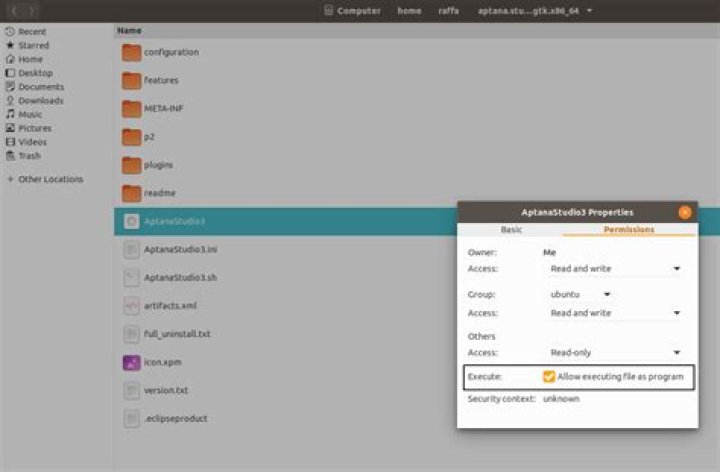
AptanaStudio3file and right click on it and select properties. - Please, select the Permissions tab and put a check mark next to Execute like in the image below:
Finally: Double click on the AptanaStudio3 file to run Aptana Studio 3 and enjoy.


