How to give a specific user a read ONLY permission to a specific folder in Linux without root?
I want to give a specific user with the username userA permission to only read a folder that I created.
Every other post that I found says you should either create a new group, which I cannot because I do not have root permission. When I tried creating a group groupadd class1 it displayed the following message:
groupadd: Permission denied. groupadd: cannot lock /etc/group; try again laterThe other solution that was suggested by different posts is that I should make the user an owner of the folder, which I'm not comfortable doing because I do not want them adding others to the folder.
12 Answers
You can do it using ACLs (Access Control Lists).
setfacl -m u:userA:rx folder
if you want to give userA access to folder only (the user won't be able to read files within folder) or
setfacl -R -m u:userA:rX folder
if you want to give access to folder and all (already existing) files and subfolders within it.
Seems like you might really have TWO problems. But you also might not.
Your /home directory, the only place where a non-admin can reliably store files, has historically had a default setting of world-readable. EVERYBODY can already read all of your files...and write to (almost) none of them.
$ ls -lah /home/
total 16K
drwxr-xr-x 4 root root 4.0K Dec 3 2016 .
drwxr-xr-x 24 root root 4.0K Oct 16 2019 ..
drwxr-xr-x 21 1001 1001 4.0K Aug 17 2017 susan
drwxr-xr-x 45 me me 4.0K Oct 20 15:30 me
In this example, I can read (not write) to all of Susan's files, and she can read all of mine. I can also launch any of her applications and scripts. I can copy her files, and my copy (in my directory) will become writable by me (not her).
If this setup is okay with you, then your problem is already solved: Your specific user already has read-only access.
If you convince your admin to lock down your /home directory so nobody can read your files anymore, it will look like this:
$ ls -lah /home/
total 16K
drwxr-xr-x 4 root root 4.0K Dec 3 2016 .
drwxr-xr-x 24 root root 4.0K Oct 16 2019 ..
drwx--x--x 21 1001 1001 4.0K Aug 17 2017 susan
drwx--x--x 45 me me 4.0K Oct 20 15:30 me
Now Susan cannot read my files anymore (nor I hers), and I must use a group to grant access to anybody else.
You are completely right that only an admin can create a group, and only an admin can edit the members of that group.
Step 1: You can change the permission of your own directories and files.
Example:
mkdir /home/me/public-view
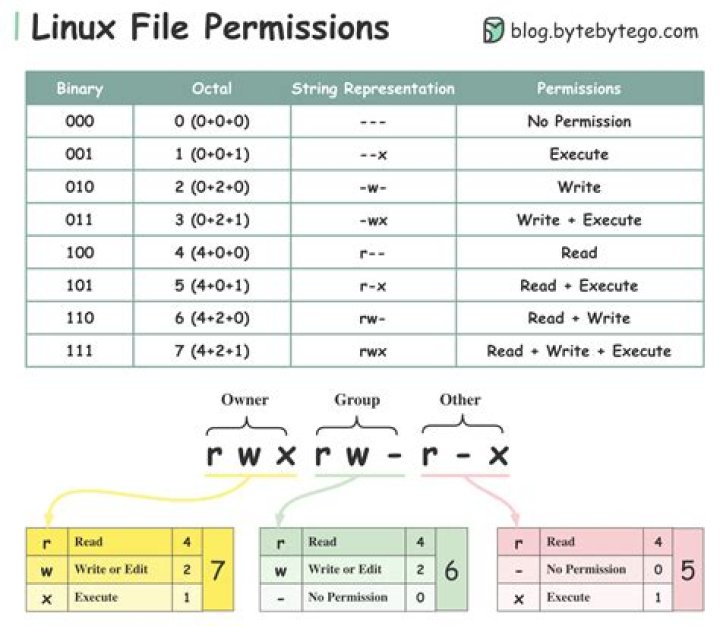
chmod 751 /home/me/public-view // 7 means you have complete control over the directory // 5 means 'read-only' for members of the group // 1 means nobody outside you or the group can access it // but it will still show up on directory listings
Step 2: The admin creates a new group, adds Specific Person to that group, and changes the ownership of your directory so that the group (consisting of one person) can access it. Since you are the owner, you still have read/write access to everything in the dir (that's why you made sure you had permission '7' in the first column of chmod).


