How to get plain text, colon separated file into spreadsheet with data separated into columns
I received a digest of registrations for events. The fields are separated by colons and in plain text. Can I copy and paste this info into libreoffice spead and get it displayed in columns?
1 Answer
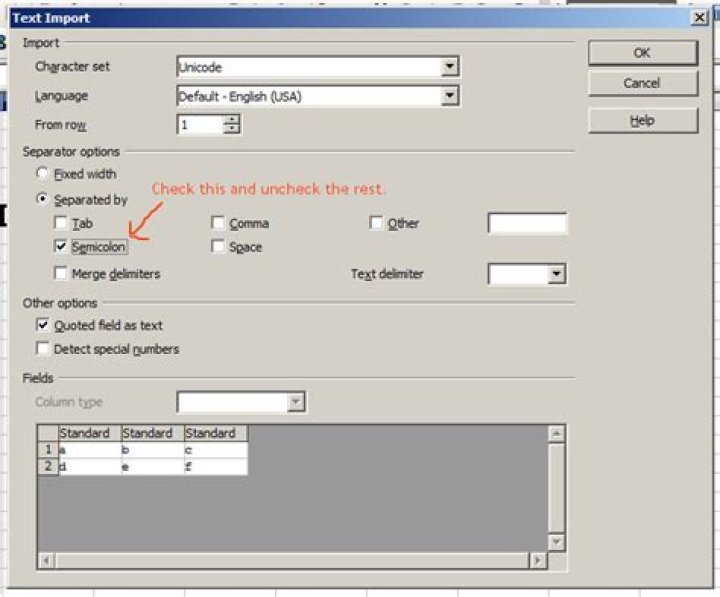
Yes, you can either copy + paste it or change the filename extension to .csv and open it. Then, when you do that, for the separator uncheck everything (comma, tab, etc.) then check "semicolon".
For example, when pasting the following text into libreoffice calc:
a;b;c
d;e;f
The dialog comes up:
(source: snag.gy)
This dialog will come up when you either open a .csv file or paste multi-line data. Either way works, whatever is more convenient for you (but if your data is only one line you'll have to open it as a .csv file instead of copy + pasting it, an irritating quirk of libreoffice).
Choose a double quote (") for "text delimiter" if your text fields are quoted (e.g. if fields that themselves contain semicolons appear in double quotes).
Re: Your comments below:
Sounds like it's not actually "plain text" - perhaps it is formatted text from a web page or something. In this case, in libreoffice, right click on the cell you want to paste it on and pick "Paste Special...", then choose "Unformatted Text" from the list and the dialog should display.
2

