How to get Dynamic Cell Value from another Sheet to an Excel Sheet Cell?
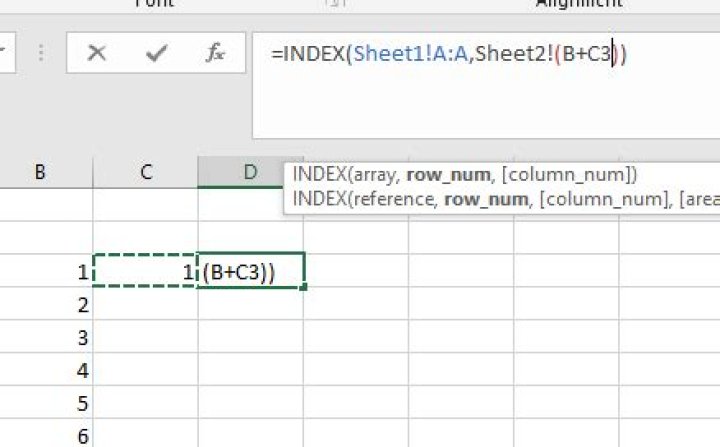
Hope You all doing good .I New to Excel. What I'm Looking for is to get a Cell Value from another sheet on the same work book. But the address of the cell cannot predict initially, It depends upon the value entering on the cell of first sheet. I explain my problem with an example I have two sheets sheet1 and sheet2 when user enter a value on one cell sheet1 (assume that is 12) then I need to get the value of A12 from sheet2 to any cell of sheet1?.Is there a possible solution without VBA?. Please Help me?
Note :- this value 12 is an example it can 100 ,5 , 200 or X so what I would like to have is the value of cells A100, A5 , A200 and AX from sheet2(ie, =Sheet2!A100,=Sheet2!A5, =Sheet2!A200 or =Sheet2!AX)
On the above image when user enter a value 1 on cell C2 of sheet1 ,I need to get Sheet2!1 on cell D2 of sheet1what I have tried is that
=INDEX(Sheet1!A:A,Sheet2!(B+C3)) the '+'operator I'm used for concatenation purpose and not for addition AND =+Sheet2!("B" &C3)
but which is not working.
2 Answers
You can use a reference to the cell in another sheet.
In a blank cell, type a = sign, then click on the sheet and then on the cell. Confirm with the Enter key.
That will create the reference like =Sheet1!$A$
Whenever the value in cell A1 on Sheet1 changes, the cell with the formula reference will also change.
Edit: for the scenario you describe, i.e. you provide the row number and the formula gets the data from column A in another sheet, you can use a formula along the following (assuming you enter the number into cell B5 on Sheet2)
=Index(Sheet1!A:A,Sheet2!B5)You enter this formula on Sheet2. In words: Get the value from column A in Sheet1, from the row number that is the same number as cell B5 on Sheet2.
Edit 2 after screenshot added to question
You may want to learn how to use cell references properly. Your formula has several issues: brackets between sheet and cell reference, cell reference without a row number. It looks like you want to use the result of adding cells B3 and C3 and use that number in the Index function.
When you construct such a formula, you don't need to write Sheet2!B3 manually. You can just click on the cell you want to use and then Excel will write the formula for you. Your final formula should look like this:
=Index(Sheet1!A:A,B3+C3)You can "write" the formula this way:
- type into cell D3
=index(and do NOT hit Enter - click over to Sheet1 and select column A. The formula then looks like this
=index(Sheet1!A:A - type a comma
- click on Sheet2 and click cell B3
- type a + sign
- click cell C3
- type a closing bracket for the formula and hit Enter
When you reference cells on the same sheet, you don't have to enter the sheet name. I only did that in my example to illustrate where the cell is located.
7Finally I got the answer it is the INDIRECT function, in the above case if user enter the value on cell B2 of sheet1 then the formula is =INDIRECT("Sheet2!A"&B2)


