How to download the Waymo Open Dataset on Ubuntu 20.04?
I'm attempting to download the Waymo Open Dataset on Ubuntu 20.04 and I'm running into one problem after another. First I went here:
Entered my name, etc., then under "Perception Dataset" I choose chose the v1.2 "individual files" link which leads to:
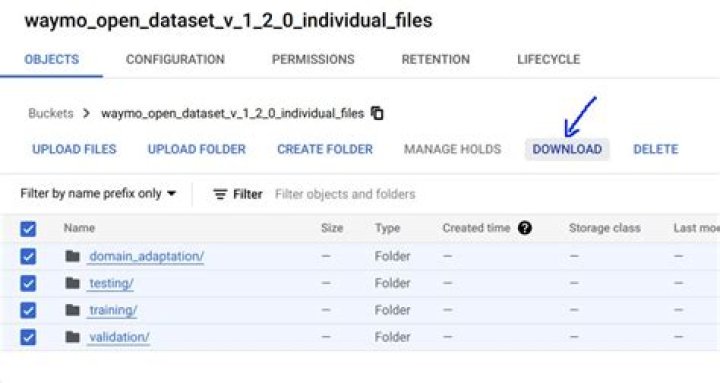
I've used various cloud services before but I have not used Google Cloud Platform before. I checked all the boxes, then choose "Download":
A pop-up box appeared instructing to enter this command:
gsutil -m cp -r \ "gs://waymo_open_dataset_v_1_2_0_individual_files/domain_adaptation/" \ "gs://waymo_open_dataset_v_1_2_0_individual_files/testing/" \ "gs://waymo_open_dataset_v_1_2_0_individual_files/training/" \ "gs://waymo_open_dataset_v_1_2_0_individual_files/validation/" \ .I ran the command, and got an error "gsutil not recognized", so I did:
sudo apt-get install gsutilThen ran the recommended command again, upon which I got this error:
Unknown option: m
No command was given.
Choose one of -b, -d, -e, or -r to do something.
After some Googling I found this post:
so I did:
echo "deb [signed-by=/usr/share/keyrings/cloud.google.gpg] cloud-sdk main" | sudo tee -a /etc/apt/sources.list.d/google-cloud-sdk.list
curl | sudo apt-key --keyring /usr/share/keyrings/cloud.google.gpg add -
sudo apt-get update
sudo apt-get install google-cloud-sdk
Now when I run the recommended command above I get:
$ gsutil -m cp -r \
> "gs://waymo_open_dataset_v_1_2_0_individual_files/domain_adaptation/" \
> "gs://waymo_open_dataset_v_1_2_0_individual_files/testing/" \
> "gs://waymo_open_dataset_v_1_2_0_individual_files/training/" \
> "gs://waymo_open_dataset_v_1_2_0_individual_files/validation/" \
> .
ServiceException: 401 Anonymous caller does not have storage.objects.get access to the Google Cloud Storage object.
CommandException: 1 file/object could not be transferred.
This dataset is public so a password or equivalent should not be necessary. Has anybody else using Ubuntu gotten this dataset to download successfully? I've download other autonomous car datasets (Lyft Level 5, Kitti, etc.) and also used AWS on this same computer without running into problems. What am I doing wrong?
31 Answer
I was able to work this out, here are the steps:
Google Download Waymo Dataset or similar, should take you to
Choose Download towards the top right, you will have to enter your name and email address the first time doing this, don't worry, they don't spam you with emails or anything, go ahead and enter your info.
Once on the Download page scroll down and find the dataset you're attempting to download, for example Perception, v1.2, tar files, will take you to .
Choose the checkbox above the files/directories so that the checkbox for every directory is checked (see screenshot in question above), then choose DOWNLOAD, this will bring up a command like this:
gsutil -m cp -r \ "gs://waymo_open_dataset_v_1_2_0/domain_adaptation/" \ "gs://waymo_open_dataset_v_1_2_0/testing/" \ "gs://waymo_open_dataset_v_1_2_0/training/" \ "gs://waymo_open_dataset_v_1_2_0/validation/" \ .Open a terminal and copy/paste this in, if you get a message like this:
Unknown option: m
No command was given.
Choose one of -b, -d, -e, or -r to do something.
That means you have a package installed with a gsutil command, but it's not the one that goes with the Google Cloud SDK! So if you get this message uninstall this other gsutil package:
sudo apt-get purge --auto-remove gsutilNow install the Google Cloud SDK via snap:
snap install google-cloud-sdk --classicAlternatively, you can go to and follow the manual download and configure instructions, but honestly the snap package is much easier and works great so I would recommend that option.
Now attempt to run the gsutil command above from the terminal again, you will now get an error like:
ServiceException: 401 Anonymous caller does not have storage.objects.get access to the Google Cloud Storage object.
CommandException: 1 file/object could not be transferred.
To resolve this, in your default browser log into your Google account if you haven't already, then from a terminal do:
gcloud auth loginThis will open your default browser to a page where it will ask you to grant permission for Google cloud to do stuff, go ahead and allow permission. For more info on this topic see this post
Finally go back to a terminal and issue the gsutil command above one more time and it should work now. Why in the hell Google makes it this complicated and does not provide clear instructions on how to do this anywhere, I'm not sure.
----- Edit -----
I ran into yet another problem downloading the Waymo dataset this morning, which I was able to fix. Specifically, for the Motion Dataset v1.1 only, the command that Google Cloud gives you to download does not work:
gsutil -m cp -r "gs://waymo_open_dataset_motion_v_1_1_0/uncompressed/" .It won't show an error or hang, it simply does nothing. The trick is to remove the quotes:
gsutil -m cp -r gs://waymo_open_dataset_motion_v_1_1_0/uncompressed .Then it seems to work fine. See this issue for more details.


