How to disable routing all network traffic through OpenVPN?
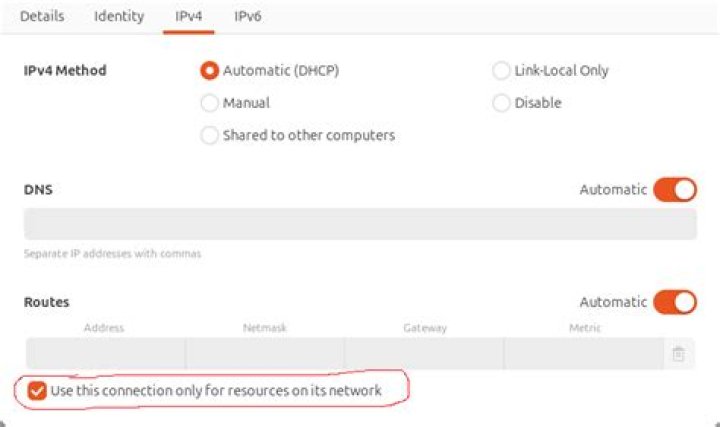
I installed OpenVPN on an Ubuntu machine at home, but when I connect to it, all my network traffic goes through it. I don't want this to happen.
I would like to be able to see only the local LAN network, but not routing all traffic.
How could this be done?
Thanks!
42 Answers
To condense Tom Yan's comments into an answer:
- make sure there are no
redirect-gatewaylines in your client config - add the following line to filter out any
redirect-gatewaysettings pulled from the VPN server:
pull-filter ignore redirect-gateway
The method is documented in , but it only mentions the --pull-filter command-line parameter, not how to add it to a config file.
For completeness, there are two other methods mentioned there also:
- Ignore all routes with
route-noexecorroute-nopull - Override them with a set of
routedirectives. This should work even if manual routes were used rather thanredirect-gateway def1(by giving four/2subnets that overridedef1's two/1routes):
4route 0.0.0.0 192.0.0.0 net_gateway route 64.0.0.0 192.0.0.0 net_gateway route 128.0.0.0 192.0.0.0 net_gateway route 192.0.0.0 192.0.0.0 net_gateway
If you are using Ubuntu machine as OpenVpn Server you can find OpenVpn server configuration either under
/etc/openvpn/server.confor
/etc/openvpn/server/server.confif you will cat this file it will look something like this
ifconfig-pool-persist ipp.txt
push "dhcp-option DNS 8.8.8.8"
push "redirect-gateway def1 bypass-dhcp"
dh none
ecdh-curve prime256v1
tls-crypt tls-crypt.key
crl-verify crl.pem
ca ca.crt
cert server_3BYLUHGJfabF8i1.crt
key server_3BYLUHGJfabF8i1.key
auth SHA256
cipher AES-128-GCM
ncp-ciphers AES-128-GCM
tls-server
tls-version-min 1.2
tls-cipher TLS-ECDHE-ECDSA-WITH-AES-128-GCM-SHA256
client-config-dir /etc/openvpn/ccd
status /var/log/openvpn/status.log
verb 3
You have to comment ## push "redirect-gateway def1 bypass-dhcp" and add specific traffic sub net you want to pass through this VPN server like
push "route 10.2.2.100 255.255.255.255" ## some internet server
push "route 54.201.1.19 255.255.255.255" ##example.com
after saving this configuration file now you can restart OPENVPN service
systemctl restart 

