How to decline recurring Outlook meetings beyond a certain date?
I can attend some of the meetings I have been sent, but beyond a point in time, this will not be possible. Therefore I would like to remove all the meetings beyond this date.
Seemingly the only options are
- decline all
- decline one
The only solution I can think of is to wait until the last meeting has occurred, then remove the series, but why should I have to do that?
EDIT: some people seem to have not noticed that I am asking from the point of view as an invitee and NOT a meeting organiser
17 Answers
Not possible unfortunately. You can vote here
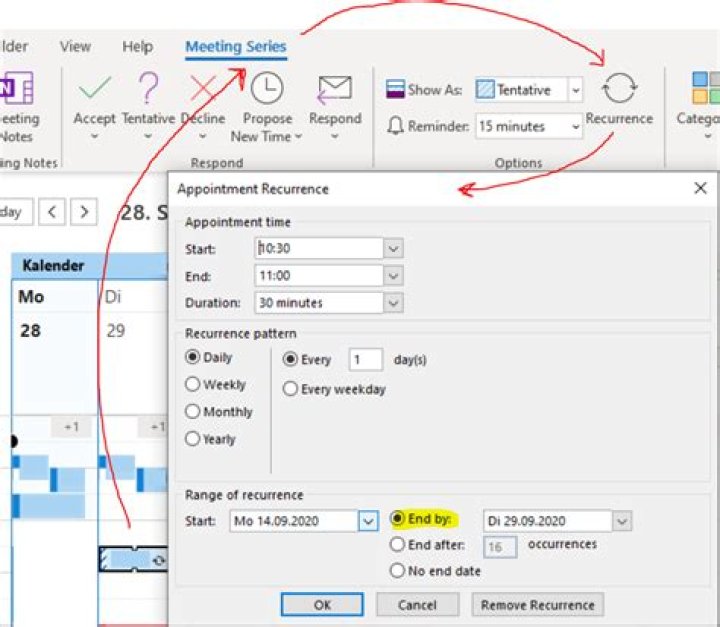
1Had the same issue (as attendee who did not organize it). In Outlook 365 app, I clicked on the Appointment in calendar view and at the ribbon bar a new tab Meeting Series occur with Recurrence where I can set the End Date.
BUT I think in this case the meeting organizer is not informed, it's just removed from my calendar!
1You should be able to change the "End By" date within the recurrence settings of the series.
- Open the entire series of the meeting(s) in question.
- Open the Recurrence dialogue box. (see screenshot below)
- Select and change the End By date.
I'm using Outlook 2013, but you can Google "Recurrence tab + Outlook version" to work out where it's located if your Outlook differs.
As the invitee (the person invited, not the organizer) it is still not possible to decline future meetings in MS Outlook / MS Office.
If you're not the meeting organizer, you can't edit the meeting details, so to remove all future meetings in a series from your calendar, you'll need to delete the meeting series.
So after landing here after searching for exactly the same, I believe that as of 2022 the only answer is to create a macro that will do the following:
- Macro will ask for specific series and the date range to cancel
- Decline all relevant meetings but only send a response to the first meeting in the series with a custom message informing the organizer about the date range that you are not joining anymore. Then do not send a response to all the other meetings that are being declined (just to prevent spamming the organizer)
- The organizer will now have the appropriate status for each meeting (even if you did not send a response it will be captured) and has received only 1 e-mail to inform about the meeting that was planned the soonest that you're not joining until a certain date or indefinitely
So now that I have typed out the idea, I might actually give this a shot since I have need for it, I'll post it if it works out (and if you are viewing this in 2025, know that I failed).
It worked on my mac book pro by going to outlook 2011 version 14.5.7, go to calendar. Open calendar-> see Home-> appointments series-> organize-> tools. Click on appointments series. Go onto the specific meeting/appointment/class, etc. You want to start by higlighting it then open your appointment screen and you have subject, location, starts, ends, and below that you have : recurrence :
For example: I have in my case a specific class every two weeks starting jan 09 /2014 and at the end of this line you have two little arrows (looking like they turn like a wheel). Click on it. You will have a pop up screen, then you choose from there the starting and ending times. (I had put unlimited) so I finally put an :"end time"
Hope it is clear and helpful ..(this is for outlook for mac)
1It's actually much simpler than that. Simply go to your calendar and find the meeting placeholder at each recurring date. You can then accept each instance separately.
2

